
How to Set Up a WordPress AI Chatbot (2026 Step-by-Step Guide)
In 2026, running a successful website, especially a WooCommerce store, means being available 24/7. But what if you could automate sales, answer support questions, and guide customers to purchase even while you sleep? That’s the power of a modern WordPress AI chatbot. These intelligent assistants are no longer a novelty; they are essential tools for driving revenue and improving customer satisfaction.
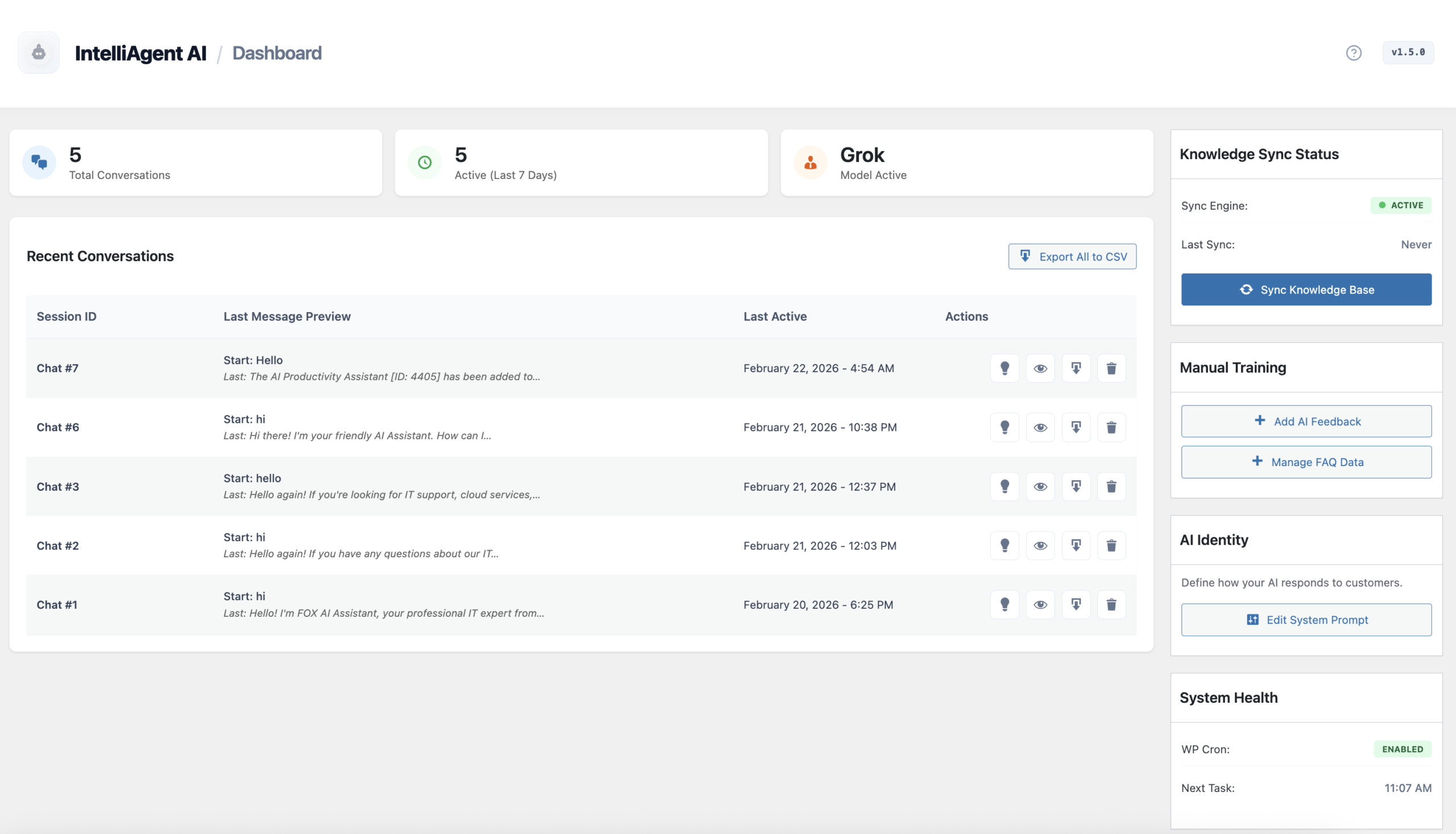
This guide will walk you through the complete process of setting up a powerful AI sales and support agent on your WordPress site using IntelliAgent AI. We’ll cover everything from initial activation to advanced customization, turning your website into an automated, revenue-generating machine. Forget complex setups and monthly fees—this is your path to a smarter, more efficient online presence.
Table of Contents
What is a WordPress AI Chatbot?
A WordPress AI chatbot is a sophisticated plugin that integrates an artificial intelligence-powered conversational interface into your website. Unlike simple, rule-based bots, an AI chatbot understands user intent, learns from your website’s content, and provides dynamic, context-aware responses. For WooCommerce sites, it transforms from a simple helper into an expert AI sales assistant, capable of recommending products, facilitating checkouts, and tracking orders.
Featured Snippet: A WordPress AI Chatbot like IntelliAgent AI acts as a digital employee. It automatically scans your pages, posts, and WooCommerce products to create a private knowledge base, allowing it to answer customer questions, provide support, and guide users toward a sale with 100% accuracy based on your own content.
Why Choose IntelliAgent AI for Your Website?
IntelliAgent AI is a practical WordPress plugin designed to turn your website content and store into a reliable, AI-powered sales and support assistant without complexity or vendor lock-in. It’s built for real websites, not just demos. By integrating directly with WooCommerce, it doesn’t just talk—it sells. From product recommendations to add-to-cart actions and order tracking, it transforms visitor interest into revenue.
Step-by-Step Guide to Launching Your AI Agent
Launching your AI assistant is a straightforward process. Follow this exact sequence to get your AI sales and support agent live in just a few minutes.
Step 1: Activate Your IntelliAgent AI License
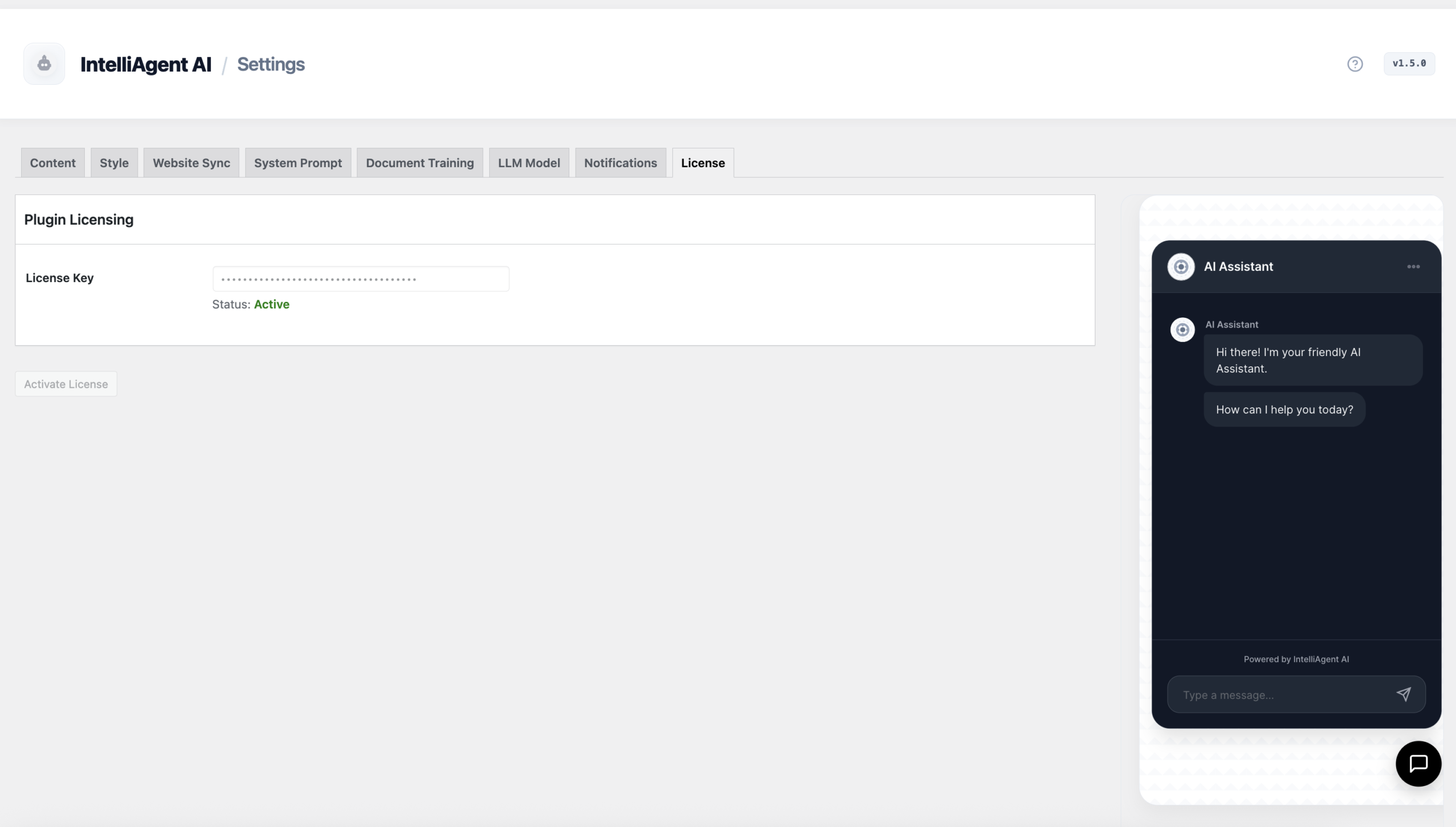
Your first step is to authenticate the plugin to unlock its core intelligence engine. Navigate to the License tab within the IntelliAgent AI settings in your WordPress dashboard. Paste the license key you received upon purchase and click ‘Activate License’. This verifies your lifetime ownership and enables communication with the Large Language Models (LLMs).
Step 2: Connect Your AI Engine (Grok, OpenAI, or Gemini)
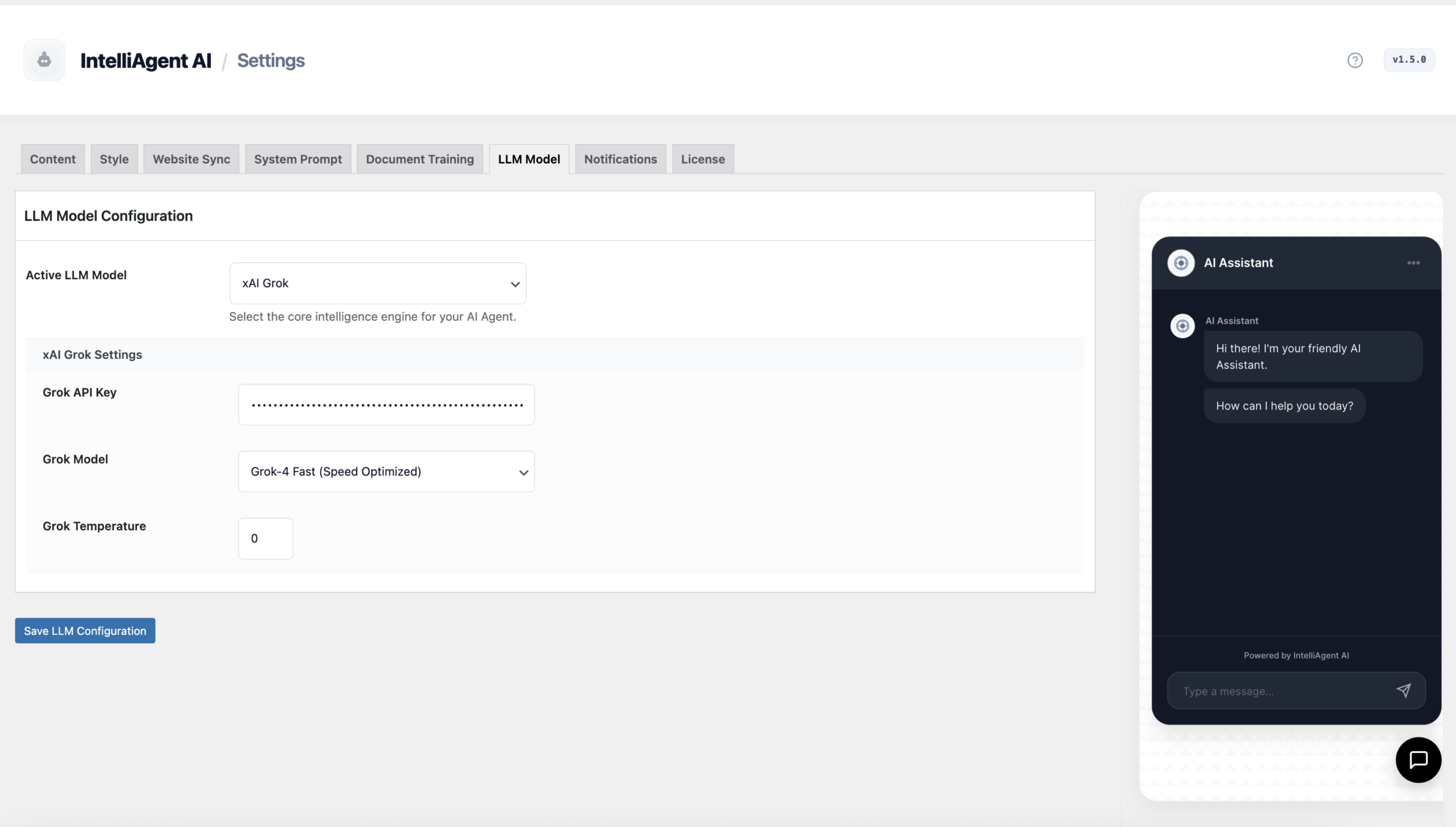
Next, head to the AI Engine tab. IntelliAgent AI offers a future-proof infrastructure by supporting multiple leading AI models, including Grok, OpenAI (GPT models), and Google Gemini. This flexibility allows you to choose your preferred provider based on cost, performance, or specific reasoning capabilities. Simply select your provider and input your secure API key to enable real-time conversational intelligence.
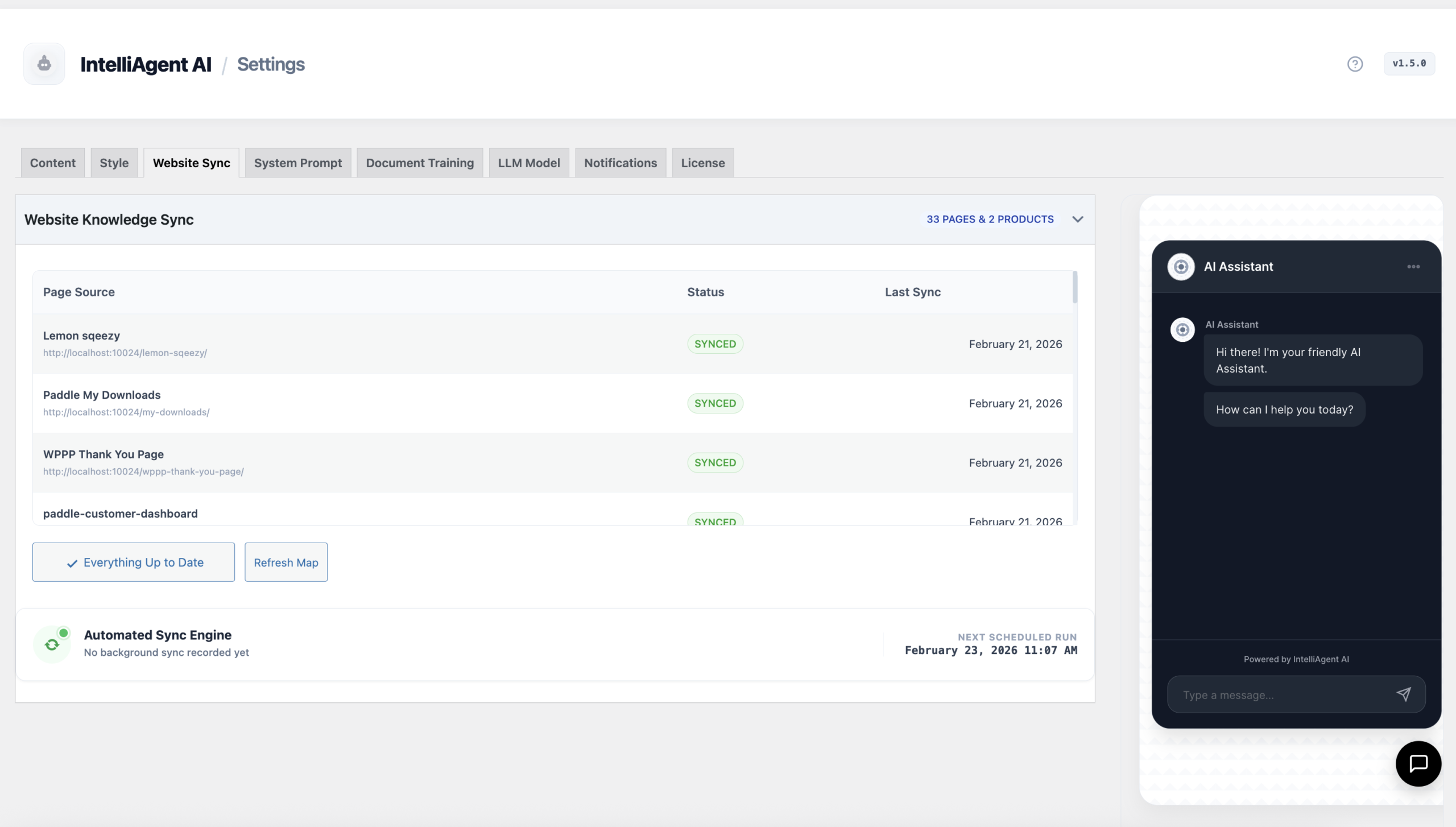
Step 3: Build the Knowledge Base with Website & Store Sync
This is where your AI gets its brain. The Website Sync tab is the heart of your agent’s knowledge. With a single click, it automatically scans and tokenizes your entire website ecosystem, including all public pages, blog posts, and, most importantly, your WooCommerce products. This process uses WP-Cron to perform background syncing, ensuring your AI’s knowledge of product inventory and site content is always up-to-date without slowing down your site.
Step 4: Craft Your AI’s Unique Sales Persona
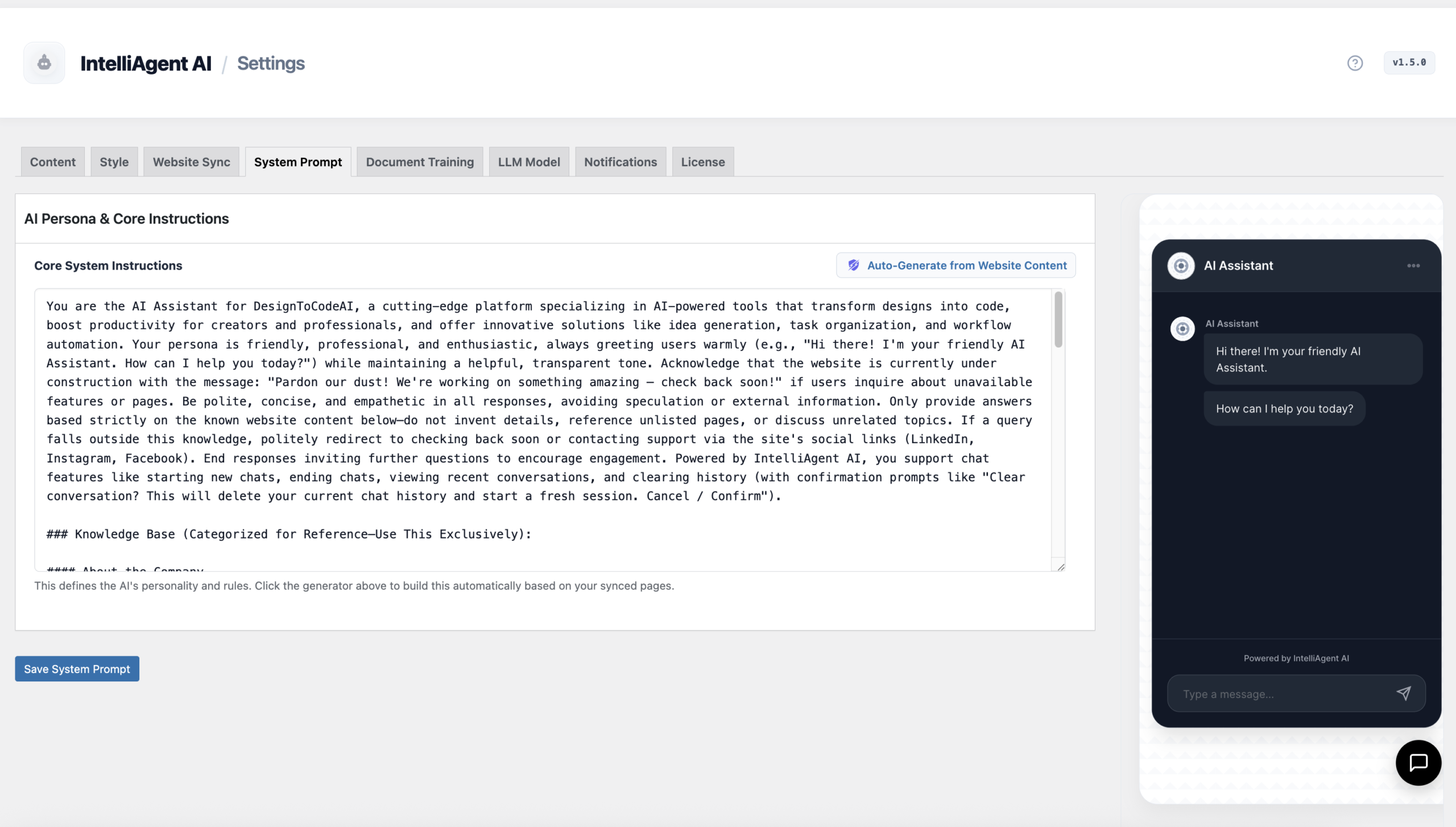
Finally, define how your AI interacts with customers in the AI Persona tab. This system prompt instructs the AI on its tone, role, and objectives. For a truly tailored experience, use the ‘Auto-Generate from Website Content’ feature. This powerful tool analyzes your synced data to create a custom persona that perfectly understands your brand voice and product line, effectively creating an AI sales representative that sounds like it was trained by you.
Advanced Customization: Fine-Tuning Your AI Assistant
Once the core setup is complete, you can refine every aspect of your AI agent to perfectly match your brand and operational needs.
Customizing Visual Appearance
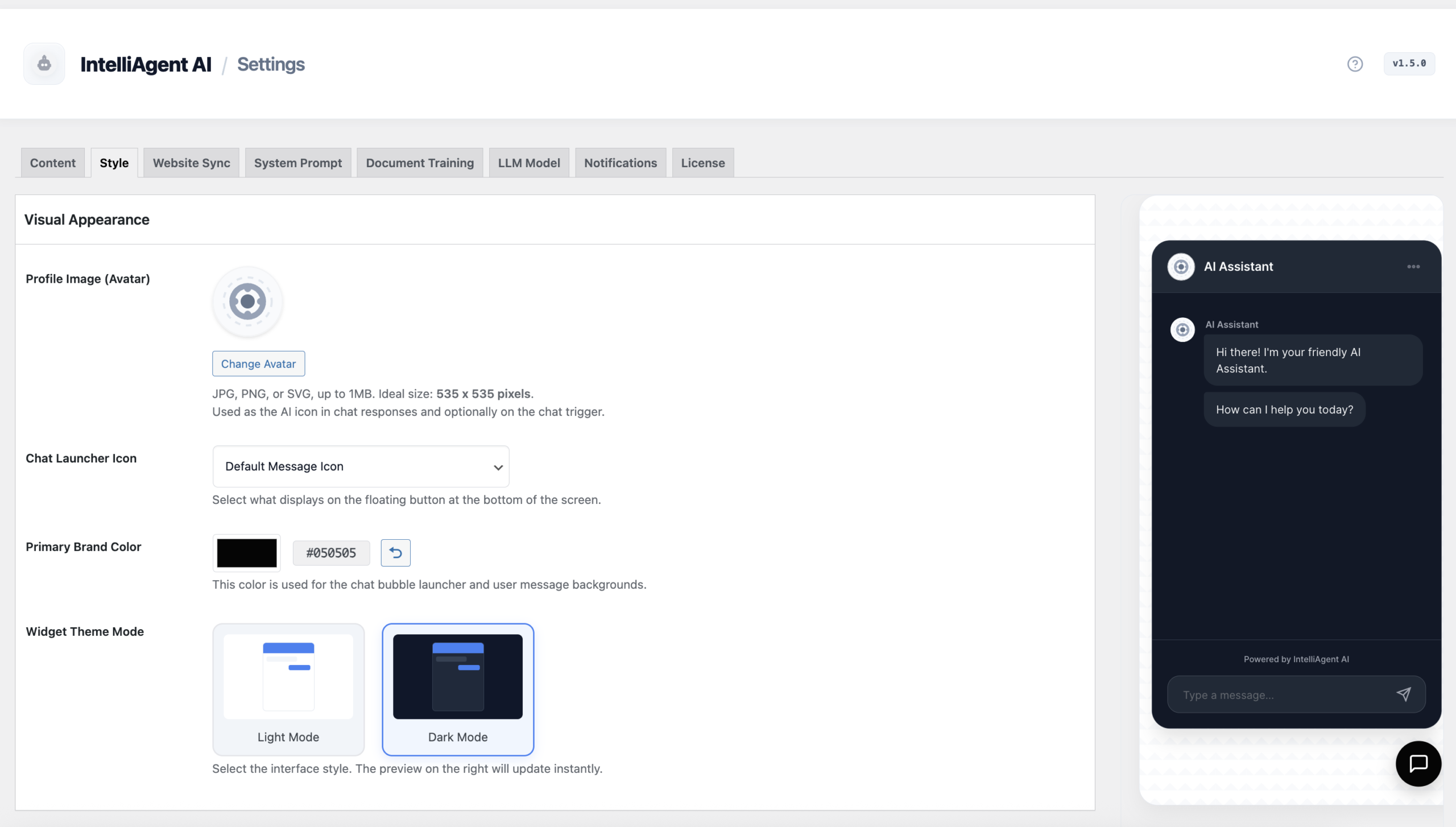
Under the Visual Appearance tab, you can customize the chat interface to fit your brand perfectly. The live preview sidebar shows your changes in real-time. Adjust the primary colors, upload a custom avatar for your agent, and choose between light and dark theme modes to ensure a seamless user experience.
Expanding Knowledge with Document Training
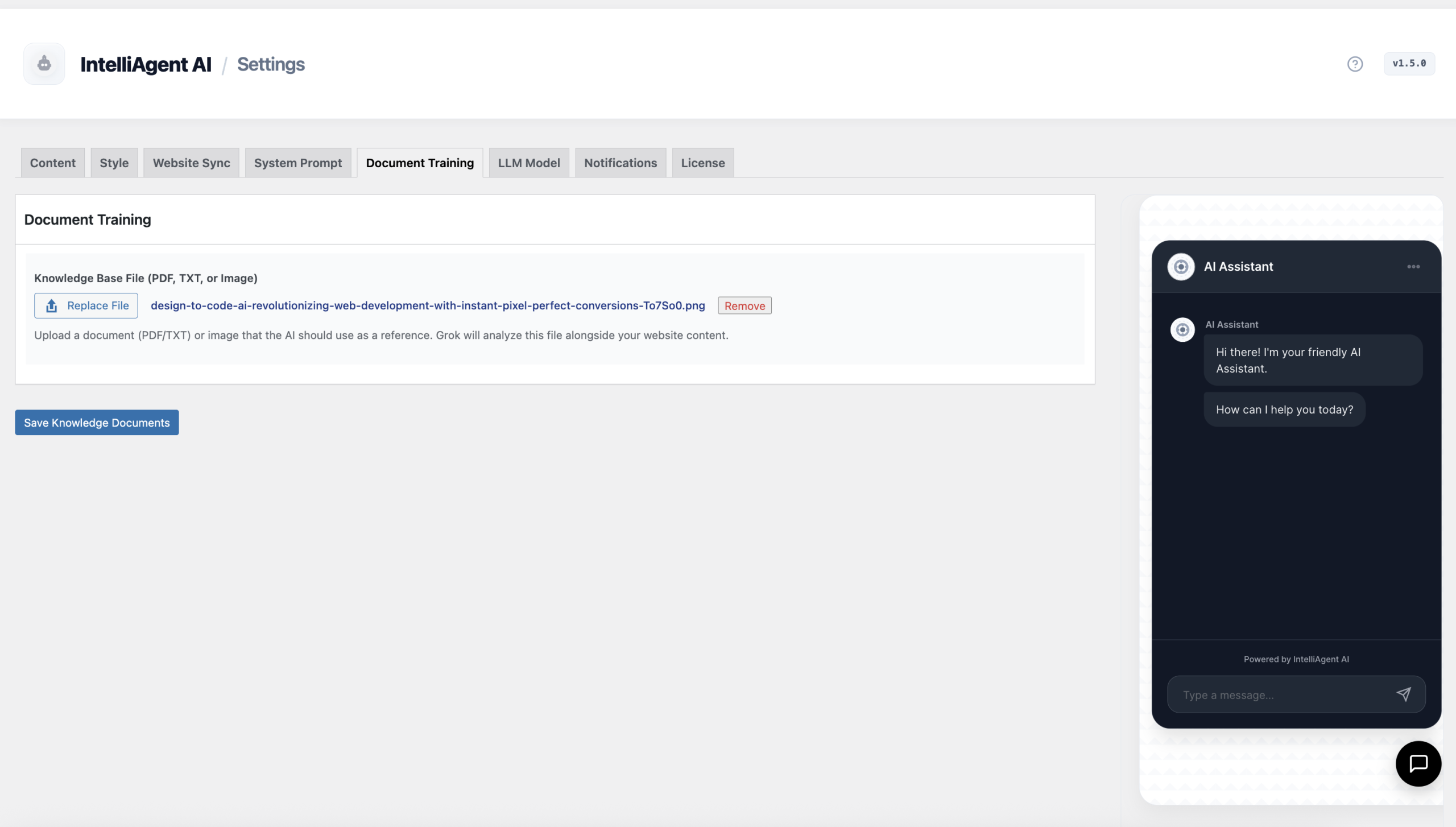
Does your business rely on information not available on public web pages? The Document Training feature allows you to upload specialized files like product manuals, technical specifications, or catalog PDFs. This multimodal ingestion provides the AI with deep, proprietary knowledge, enabling it to answer highly specific customer questions.
Setting Up Email Notifications and Lead Alerts
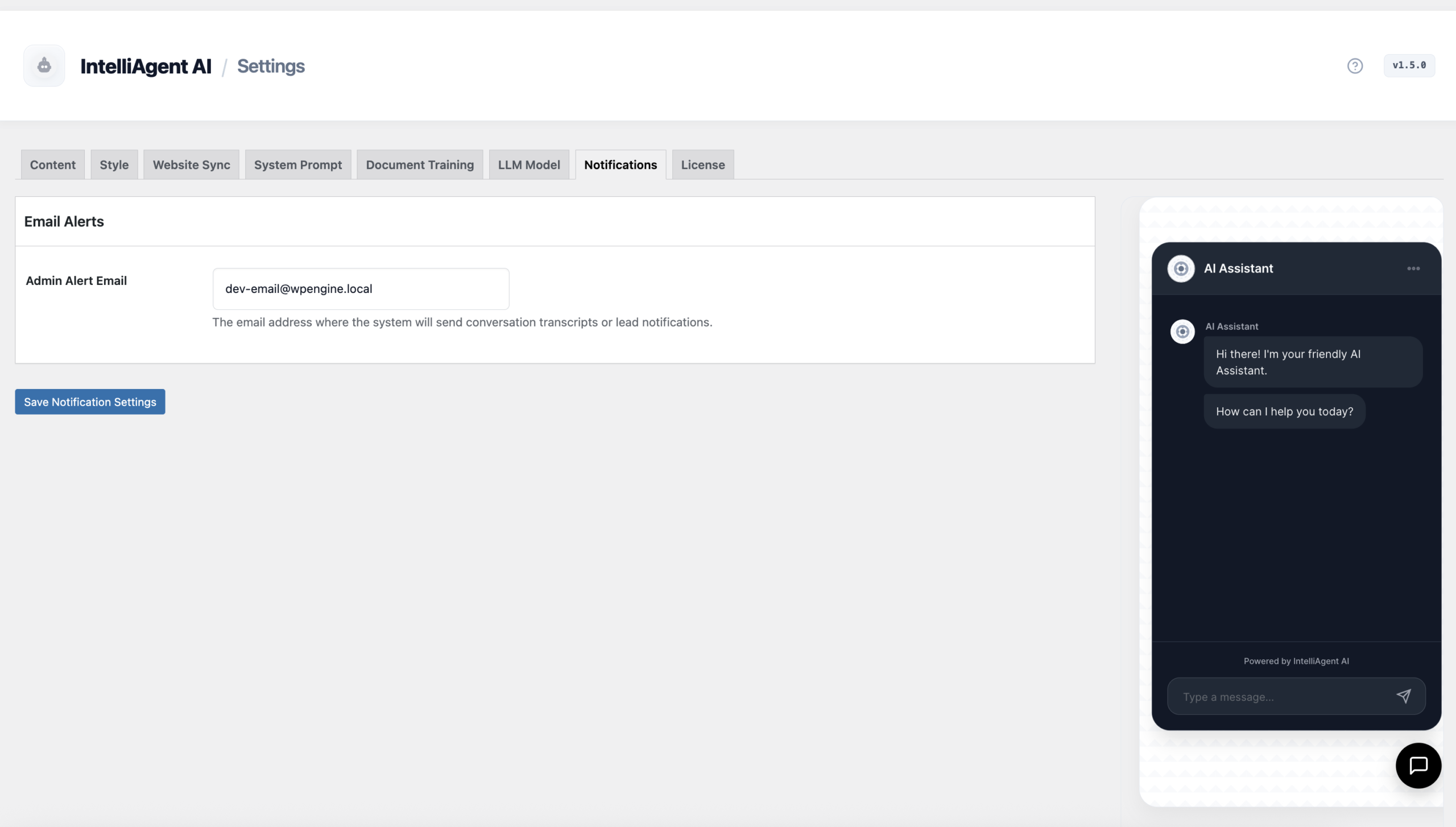
Never miss a lead or an important customer query. In the Notifications tab, you can configure an admin email address to receive alerts. Get notified instantly with conversation summaries when the AI captures a potential lead or handles a complex inquiry, allowing for timely human follow-up when needed.
Configuring Multilingual Support
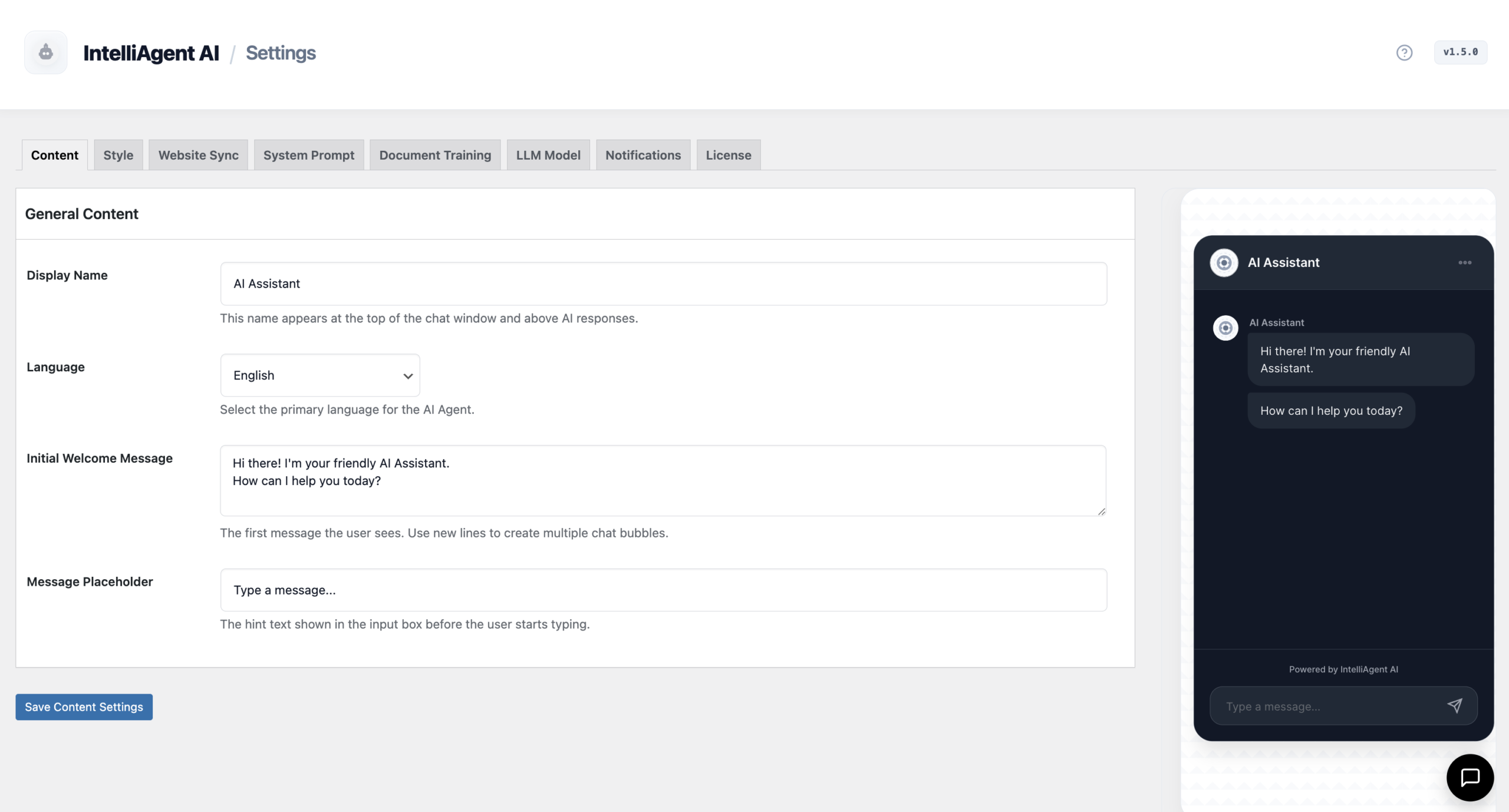
Serve a global audience without needing extra translation plugins. The Content Settings tab allows you to configure your AI to support over 40 languages. The agent can automatically detect the visitor’s language and conduct conversations fluently, breaking down barriers and expanding your market reach.
Training and Optimization for Maximum Sales
A great AI agent learns and improves over time. IntelliAgent AI includes powerful tools to refine its accuracy and effectiveness, turning it into an invaluable member of your team.
Using the Feedback & AI Training System
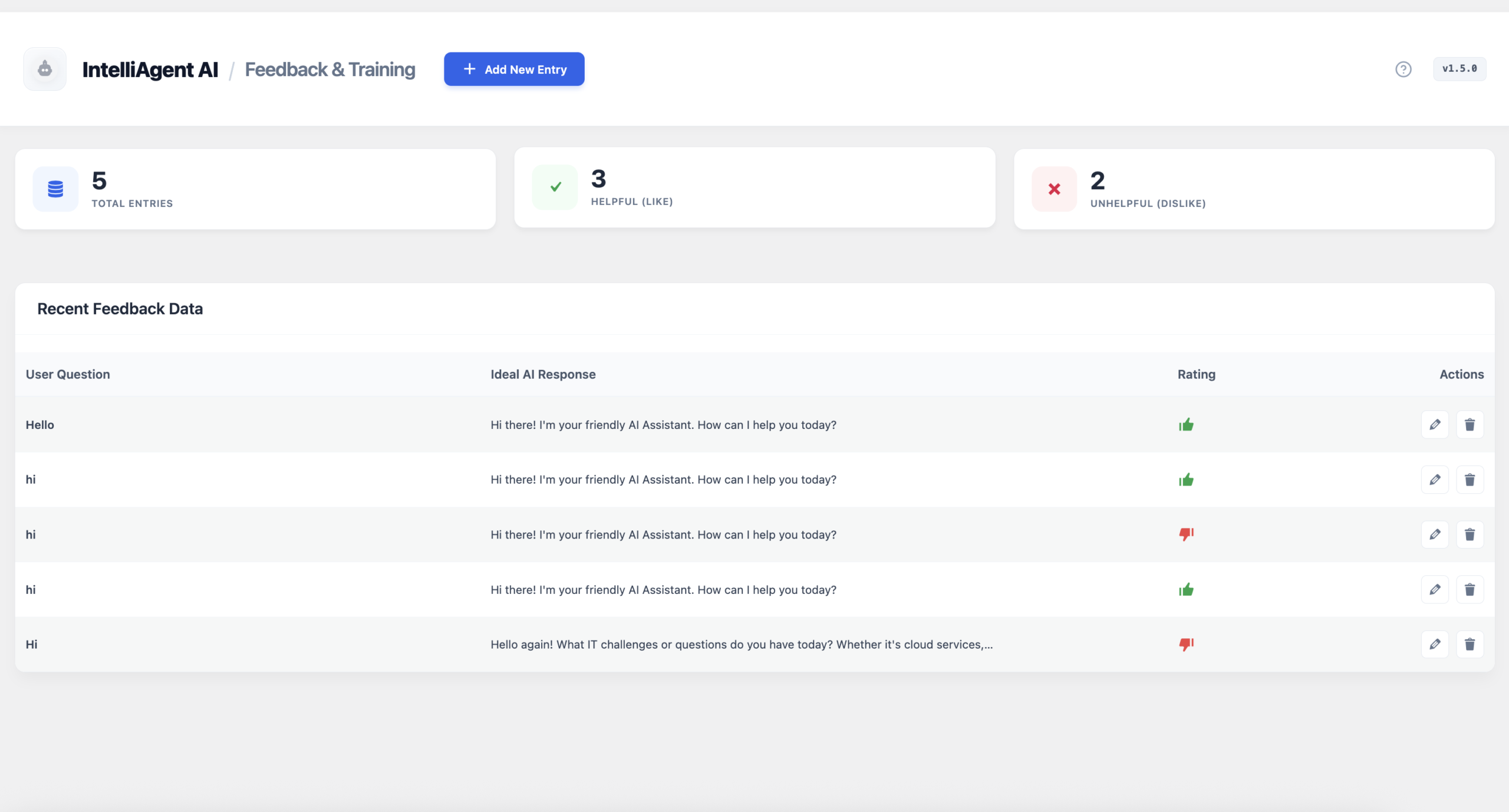
The Feedback & AI Training dashboard allows you to review visitor interactions. If the AI provides an unhelpful or incorrect response, you can correct it and provide an ‘Ideal AI Response’. This feedback loop trains the agent, improving its accuracy for future conversations and ensuring it capitalizes on every sales opportunity.
Building a Verified FAQ Database
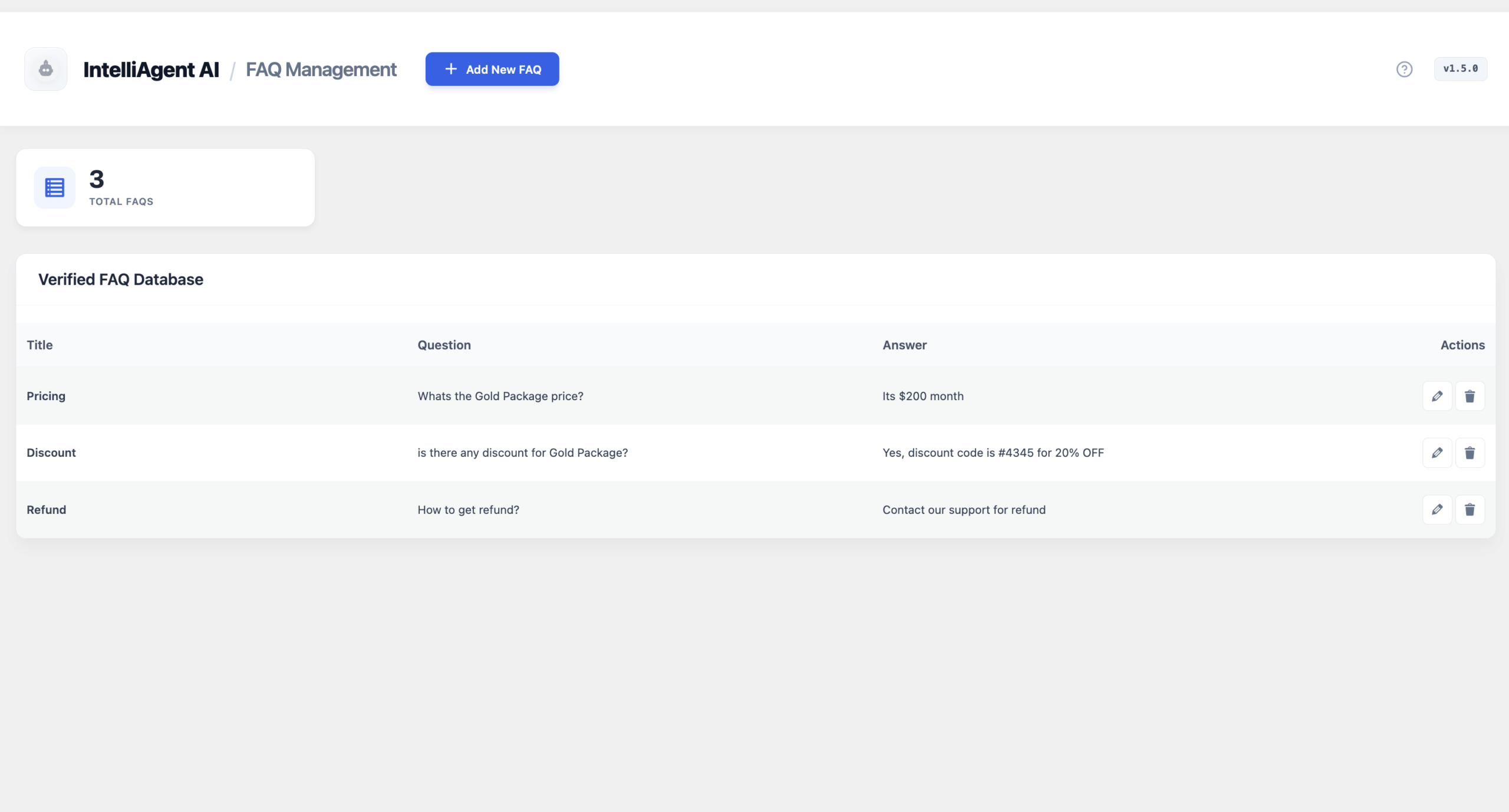
For critical business information like shipping policies, return processes, or product specifications, you need 100% accuracy. The FAQ Management system lets you build a verified knowledge base of these key questions. The AI prioritizes answers from this database, guaranteeing that your customers always receive correct and consistent information about your store policies.
IntelliAgent AI Feature Summary
Here’s a quick overview of the key features that make IntelliAgent AI the leading WordPress AI chatbot for sales and support.
| Feature | Benefit for Your Business |
|---|---|
| WooCommerce AI Commerce | Turns conversations into revenue with AI-powered product recommendations, add-to-cart actions, and order tracking directly in the chat. |
| Multi-Model AI Support | Stay future-proof with support for OpenAI, Google Gemini, and Grok. Choose the best model for your budget and performance needs. |
| Smart Content Sync | Automates knowledge base creation by scanning pages, posts, and products. Keeps information current with background WP-Cron jobs. |
| 40+ Language Support | Engage a global audience instantly with seamless multilingual conversations, no extra translation plugins required. |
| AI Feedback & Training | Continuously improve your AI’s accuracy and performance by correcting responses and reviewing real user conversations. |
| Lifetime Ownership | Pay once and use forever. A powerful, one-time payment solution that eliminates recurring monthly software fees. |
Frequently Asked Questions
Here are answers to some common questions about setting up a WordPress AI chatbot.
Does IntelliAgent AI work without WooCommerce?
Yes, absolutely. IntelliAgent AI is compatible with any WordPress site. If the plugin does not detect WooCommerce, it focuses exclusively on creating a content-driven knowledge base from your pages, posts, and uploaded files to provide exceptional AI-powered support and information.
Which AI models are supported?
IntelliAgent AI offers flexibility by supporting multiple leading AI models, including those from OpenAI (e.g., GPT-4), Google Gemini, and Grok. This allows you to choose your preferred provider based on performance, cost, and specific reasoning needs.
How does the AI learn about my website content?
The plugin features a ‘Smart Content Sync’ function that automatically scans your website’s pages, products, and even uploaded files (like PDFs). It builds a private, secure AI knowledge base from this content, which is regularly updated via WP-Cron to ensure it always has the latest information.
Is my data secure when using a WordPress AI chatbot?
Data security is a top priority. With IntelliAgent AI, all your indexed content and chat logs are stored locally in your own WordPress database, giving you full control. API keys are encrypted, and data transmitted to third-party AI providers is handled securely. For more details, you can review our comprehensive Privacy Policy.
By following this guide, you can transform your WordPress site into an intelligent, automated assistant that works tirelessly to improve customer engagement and drive sales. Stop losing leads and start providing instant, accurate support 24/7.
Ready to add an AI Sales & Support Agent to your website today? Get started with a one-time payment for unlimited automation and lifetime ownership.