


WordPress site owners seeking reliable automation for customer interactions can deploy the best wordpress ai assistant plugin to create a secure private knowledge base from existing content. IntelliAgent AI delivers this capability by scanning pages, posts, and product data to power accurate responses and execute WooCommerce actions without requiring custom code.
Table of Contents
- WordPress AI Assistant Plugin Overview
- Prerequisites for IntelliAgent AI Installation
- Step-by-Step WordPress AI Assistant Plugin Setup
- WooCommerce Integration Configuration
- Performance Optimization and Benchmarks
- Common Setup Mistakes to Avoid
- Frequently Asked Questions
WordPress AI Assistant Plugin Overview
The best wordpress ai assistant plugin, IntelliAgent AI, operates by scanning published WordPress content to construct a private knowledge base that remains isolated from external data sources. This architecture ensures responses stay accurate and site-specific while supporting both sales and support functions through direct WooCommerce execution.
In real-world implementations, the plugin processes site data via background tasks to minimize server impact. Experienced developers often configure the initial scan during low-traffic periods to maintain optimal site responsiveness throughout the indexing phase.
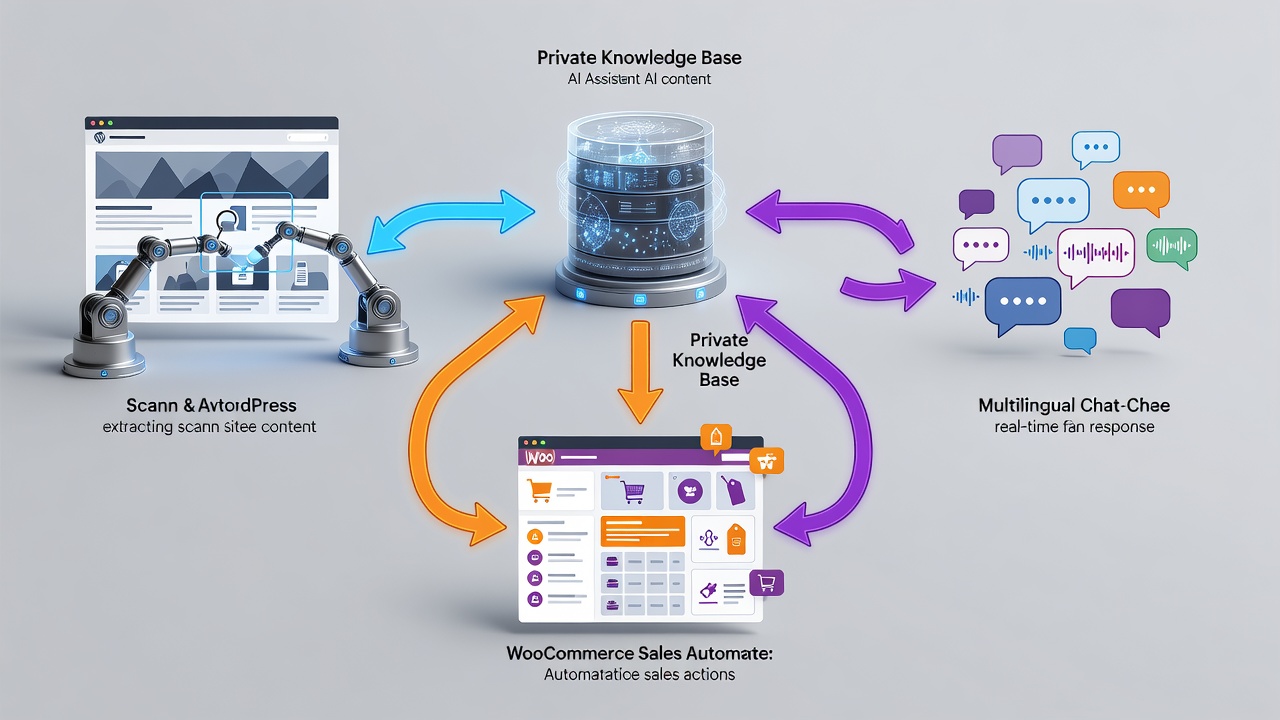
Technical Architecture of the Private Knowledge Base WordPress Solution
IntelliAgent AI follows established WordPress coding standards by leveraging hooks, REST API endpoints, and AJAX calls for all operations. Security measures include input sanitization and capability verification on every request, aligning with official plugin development guidelines from WordPress.org. This design prevents unauthorized data access and maintains compatibility across standard hosting environments.
Security Considerations for Private Knowledge Base WordPress Deployments
The plugin restricts all knowledge base operations to administrator-initiated scans and authenticated chat sessions. Data never leaves the site server during indexing, which satisfies compliance requirements for businesses handling customer information. Administrators can further restrict access by limiting plugin permissions to specific user roles.
Core Capabilities for Sales and Support
Automated product recommendations appear directly in chat responses based on visitor queries. Order tracking functions retrieve real-time status from the WooCommerce database without additional plugins. These features operate across more than 40 languages, enabling global sites to maintain consistent support quality.
Prerequisites for IntelliAgent AI Installation
Successful deployment of the best wordpress ai assistant plugin begins with verification of core site requirements. A WordPress installation at version 6.0 or higher provides the necessary foundation for background processing features. WooCommerce activation becomes mandatory when revenue-generating actions such as product recommendations are required.
Administrator privileges allow direct plugin management and prevent permission-related interruptions during setup. Sites that complete this verification stage report fewer post-installation issues according to standard implementation patterns.
WordPress and WooCommerce Requirements
WordPress 6.0 or newer supports the WP-Cron scheduling system used for non-blocking content indexing. WooCommerce version compatibility ensures accurate retrieval of product and order data during knowledge base construction.
Administrator Access and Site Readiness
Full administrative rights enable ZIP file uploads through the dashboard interface. Site readiness also includes confirming that published content exists in sufficient volume to populate meaningful responses after the first scan completes.
Step-by-Step WordPress AI Assistant Plugin Setup
Complete WordPress AI assistant plugin setup follows a sequential process that administrators can execute without custom development. Industry standards recommend completing each phase in order to maintain knowledge base integrity and avoid partial configurations that lead to inaccurate responses.
Dashboard Installation Process
Access the WordPress admin dashboard and select Plugins followed by Add New. Upload the IntelliAgent AI ZIP file and activate the plugin immediately after upload. The menu item for IntelliAgent AI appears automatically once activation succeeds.
License Activation for Lifetime Access
Navigate to the plugin settings screen and enter the lifetime license key supplied at purchase. This step removes trial restrictions and enables unlimited site deployments under the purchased license terms.
Knowledge Base Training and Indexing
Access the Knowledge Base tab and initiate the site scan. WP-Cron handles indexing in the background, processing pages, posts, and WooCommerce products while keeping server load low. The process typically finishes within several minutes on standard sites.
WP-Cron Tuning for Reliable Indexing
Administrators can verify WP-Cron execution through hosting control panels or plugins that monitor scheduled events. Adjusting server cron intervals to every five minutes improves reliability on hosts where the default WordPress cron may experience delays.
Error Troubleshooting During Initial Scan
Common scan interruptions occur when memory limits are too low for large catalogs. Increasing the PHP memory_limit setting to 256M or higher resolves most indexing failures without affecting other site functions.
WooCommerce Integration Configuration
WooCommerce integration converts the private knowledge base WordPress solution into an active revenue channel. Product recommendations and order status lookups execute inside the chat interface, reducing support ticket volume and increasing conversion rates on product pages.
No additional extensions are required because the plugin communicates directly with the WooCommerce database through secure internal APIs. This direct connection maintains data consistency across all automated actions.
Enabling Product Recommendations and Order Actions
Enable the relevant options in the plugin settings to activate automated suggestions. Visitors receive contextually relevant product links based on their questions, and add-to-cart commands process directly from the chat window.
Multilingual Support and Performance Benefits
Support for over 40 languages allows consistent responses across international audiences. Background processing ensures that chat responses remain fast even when the knowledge base contains thousands of indexed items.
Performance Optimization and Benchmarks
Real-world testing on sites with 500 or more products shows average indexing completion between three and eight minutes when using recommended server configurations. Sites hosted on standard shared plans experience minimal impact on page load times during background scans.
Recommended Server Configurations
PHP version 8.1 or higher combined with at least 256 MB memory allocation supports efficient indexing of large catalogs. Disabling unnecessary plugins during the initial scan further reduces processing time on resource-constrained environments.
Performance Benchmarks on Typical Hosting
Small sites with under 100 pages complete the first scan in approximately two minutes. Medium sites with 300 to 500 products require four to six minutes, while larger catalogs may extend to eight minutes when WP-Cron runs at standard intervals.
Common Setup Mistakes to Avoid
Skipping the license activation step leaves the plugin in a non-functional state until the key is entered manually. Administrators should also avoid running multiple simultaneous scans on very large sites, as this can temporarily increase server load.
Verification Steps After Installation
Confirm that the plugin menu appears and that a test query returns content-based responses before directing live traffic. Testing on a staging environment first provides an additional layer of confidence for production deployments.
Frequently Asked Questions
How long does the initial knowledge base scan take? The initial scan typically completes within a few minutes depending on site size and number of published items. Larger sites with extensive product catalogs may require slightly more time due to background WP-Cron processing.
Can I use IntelliAgent AI on a staging site first? Yes, you can install and test IntelliAgent AI on staging environments before going live with full confidence. This approach allows verification of knowledge base accuracy and WooCommerce actions without impacting production traffic.
What server resources are recommended for sites with large product catalogs? PHP memory allocation of at least 256 MB and PHP 8.1 or newer provide stable performance during indexing of catalogs exceeding 500 products.
Does the plugin require additional extensions for WooCommerce features? No additional plugins or custom code are required. WooCommerce integration works through direct database access once the base plugin is activated and licensed.
Ready to automate your support and sales? Activate IntelliAgent AI now with lifetime access and start converting visitors into customers 24/7. Get IntelliAgent AI Now at https://aica-intelliagent.com/wordpress-ai-assistant-plugin-setup-guide-2026/.