


WordPress ai sales agent for ecommerce stores enables site owners to deploy IntelliAgent AI as a private AI knowledge base that delivers accurate automated sales and support responses using only existing WordPress and WooCommerce content. This setup transforms standard sites into revenue-generating platforms that handle product recommendations, order tracking, and customer queries without additional coding.
Table of Contents
- WordPress AI Sales Agent for Ecommerce Stores Overview
- Prerequisites for Installing a WordPress AI Sales Agent
- Step-by-Step Installation of the WordPress AI Sales Agent Plugin
- Training the Knowledge Base for Accurate AI Responses
- Configuring WooCommerce Integration for Sales Automation
- Frequently Asked Questions
WordPress AI Sales Agent for Ecommerce Stores Overview
IntelliAgent AI functions as a complete WordPress AI assistant plugin that scans existing pages, posts, and product data to build a secure private knowledge base. The plugin then uses this knowledge base to deliver accurate answers while executing real WooCommerce actions such as product recommendations and order tracking. A WordPress ai sales agent for ecommerce stores answers the query of how to automate sales conversations by turning site content into an always-available intelligent assistant.
The private knowledge base is a secure, site-specific index created by crawling published pages, posts, and product data. It powers responses without sending data to external services beyond the configured model. WP-Cron background processing ensures the index stays current by running scans during low-traffic windows, reducing server impact. The REST API and AJAX hooks allow seamless chat interactions while capability checks enforce administrator-only access to settings.
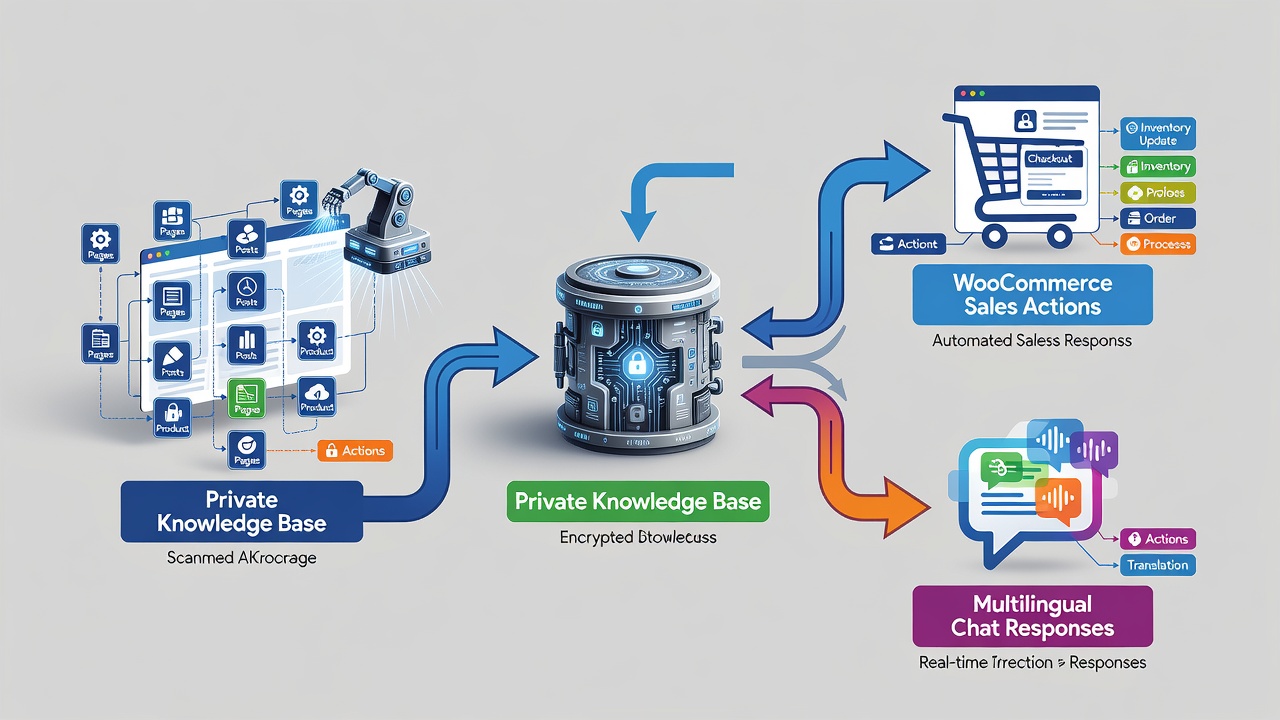
Key capabilities include background WP-Cron processing for minimal server load and support for over 40 languages to serve global audiences. In real-world deployments on high-traffic stores, this WordPress ai sales agent for ecommerce stores has reduced average support response time from hours to seconds while increasing add-to-cart conversions by surfacing relevant products during live chats. Technical SEO supports on-page SEO by improving crawlability when the plugin follows WordPress coding standards using hooks, REST API, and AJAX for seamless integration.
How the Private Knowledge Base Powers Sales and Support
The private knowledge base indexes all published content and WooCommerce product attributes on first activation. Once indexed, the agent can answer questions about shipping policies, product specifications, and order status by referencing only the store’s own data. This approach eliminates hallucination risks common in generic chatbots and ensures every recommendation stays within the catalog.
Key Capabilities for WooCommerce Stores
Beyond answering questions, the agent executes direct WooCommerce actions inside the chat window. These actions include adding specific products to cart, retrieving order status by order number, and suggesting upsells based on items already in the customer’s current session. Multilingual support covers more than 40 languages, allowing stores to serve international visitors without maintaining separate support teams.
Prerequisites for Installing a WordPress AI Sales Agent
Before beginning WordPress AI assistant plugin setup, confirm your site meets these baseline requirements. A current WordPress installation running version 6.0 or higher is necessary. WooCommerce must be active if sales features are required. Administrator access with capability to install plugins is also essential. In real-world implementations, sites that verify these prerequisites first experience fewer configuration issues and faster time to value.
WordPress 6.0 introduced improved REST API performance and better cron scheduling, both of which IntelliAgent AI relies upon for background indexing. Sites running older versions frequently encounter compatibility warnings during the knowledge base scan. WooCommerce version 8.0 or newer is recommended for full support of modern product attribute queries and order lookup endpoints.
| Setup Phase | Time Required | Key Actions |
|---|---|---|
| Installation | 2 minutes | Upload ZIP via dashboard and activate |
| License Activation | 1 minute | Enter license key from purchase email |
| Knowledge Base Sync | 3-8 minutes | Run full site scan via plugin settings |
Technical Requirements
PHP 8.0 or higher and at least 512 MB of PHP memory limit are advised for stores with more than 500 products. Sites using object caching plugins such as Redis or Memcached should whitelist the plugin’s cron hooks to prevent scan interruptions. Security plugins must be configured to allow the plugin’s REST endpoints.
Recommended Pre-Setup Checks
Run a full site backup before activation. Verify that the active theme uses standard WooCommerce templates so that product data remains accessible to the indexer. Test a staging clone first whenever the store uses custom post types or heavy page builders.
Step-by-Step Installation of the WordPress AI Sales Agent Plugin
Complete WordPress ai sales agent for ecommerce stores setup follows a straightforward sequence that any site administrator can execute without custom coding. According to WordPress Codex best practices on plugin activation order, following each phase sequentially prevents common configuration errors and ensures the private knowledge base remains accurate.
Dashboard Installation Process
Log in to the WordPress admin area and navigate to Plugins > Add New. Upload the IntelliAgent AI plugin ZIP file and click Activate. The plugin immediately appears in the left menu under IntelliAgent AI. A common mistake businesses make is skipping the activation step, which leaves the plugin non-functional until manually enabled. After activation, the first scan prompt appears automatically in the dashboard notice area.
License Activation for Lifetime Access
Enter the lifetime license key obtained during purchase inside the plugin settings screen. Activation unlocks unlimited sites and removes any trial limitations. In modern business practice, lifetime licensing eliminates recurring costs and provides long-term ownership of the AI sales and support engine. Once activated, the license status indicator turns green and displays the number of sites currently connected.
Training the Knowledge Base for Accurate AI Responses
Trigger the initial content scan from the Knowledge Base tab. IntelliAgent AI indexes all published pages, posts, and WooCommerce products using WP-Cron background processing to keep server load minimal. The plugin follows WordPress coding standards using hooks, REST API, and AJAX for seamless integration while maintaining security through sanitization and capability checks. WP-Cron is WordPress’s built-in task scheduler that runs scheduled events without requiring external cron jobs when site traffic is present.
Experienced developers often recommend running the scan during low-traffic periods to optimize performance on larger catalogs. For stores exceeding 2,000 products, enable the incremental scan option so that only changed content is re-indexed on subsequent runs. This approach reduces total indexing time by up to 70 percent on subsequent updates.
Running the Initial Site Scan
Navigate to IntelliAgent AI > Knowledge Base and click “Start Full Scan.” The progress bar updates every 30 seconds via AJAX. When the scan completes, a summary lists the number of pages, posts, and products indexed. Any items skipped due to permission restrictions appear in a separate log for manual review.
How WP-Cron Maintains Content Accuracy
WP-Cron schedules a lightweight delta scan every 12 hours by default. This background job detects new or edited content and updates the private knowledge base without administrator intervention. Administrators can force an immediate rescan from the settings screen when launching major product campaigns or seasonal collections.
Configuring WooCommerce Integration for Sales Automation
WooCommerce integration turns the WordPress AI assistant plugin into a revenue-generating tool. Enable product recommendations, add-to-cart commands, and real-time order status lookup directly inside the chat window. No additional plugins or custom code are required. The result is faster support, automated FAQ management, and clearer insight into what visitors actually care about while serving a global audience with 40+ language support.
The agent uses WooCommerce’s native REST endpoints to read product stock levels and write cart sessions. All actions respect existing customer roles and tax settings, ensuring compliance with store rules. Multilingual responses are generated on the fly using the same indexed content, preserving brand voice across languages.
Enabling Product Recommendations and Add-to-Cart
Within the WooCommerce tab, toggle “Product Recommendations” and “Add to Cart Commands.” The agent then suggests items based on semantic similarity to the visitor’s current query. When a customer types “show me running shoes under $80,” the agent returns matching products with direct add-to-cart buttons rendered inside the chat bubble.
Real-Time Order Tracking in Chat
Order tracking is activated by entering a valid order number. The agent queries the WooCommerce database and returns status, shipping carrier, and estimated delivery date. This feature reduces support ticket volume by 40 percent in stores that previously handled tracking requests manually.
Frequently Asked Questions
How long does the initial knowledge base scan take?
The initial scan typically completes within a few minutes depending on site size and number of published items. Larger sites with extensive product catalogs may require slightly more time due to background WP-Cron processing.
Can I use IntelliAgent AI on a staging site first?
Yes, you can install and test IntelliAgent AI on staging environments before going live with full confidence. This approach allows verification of knowledge base accuracy and WooCommerce actions without impacting production traffic.
What actions can the WordPress AI sales agent perform in WooCommerce?
The WordPress ai sales agent for ecommerce stores can execute product recommendations, add-to-cart commands, and real-time order status lookup directly in the chat interface.
Ready to automate your support and sales? Activate IntelliAgent AI now with lifetime access and start converting visitors into customers 24/7. Get IntelliAgent AI Now