

A wordpress ai sales agent setup guide provides the exact steps to install and configure IntelliAgent AI as a reliable sales and support assistant on any WordPress site. This plugin scans existing content to build a private knowledge base while connecting directly to WooCommerce for automated commerce actions.
Table of Contents
- WordPress AI Sales Agent Setup Guide: Installation Steps
- Connecting Site Content to the AI Knowledge Base
- Enabling WooCommerce Sales Features
- Advanced Configuration Options
- Configuring Multilingual Support and Training
- Troubleshooting Common Setup Errors
- Optimizing AI Responses for Higher Conversions
- Security, Performance, and Best Practices
- Lite Version vs Lifetime Access Comparison
- Frequently Asked Questions
WordPress AI Sales Agent Setup Guide: Installation Steps
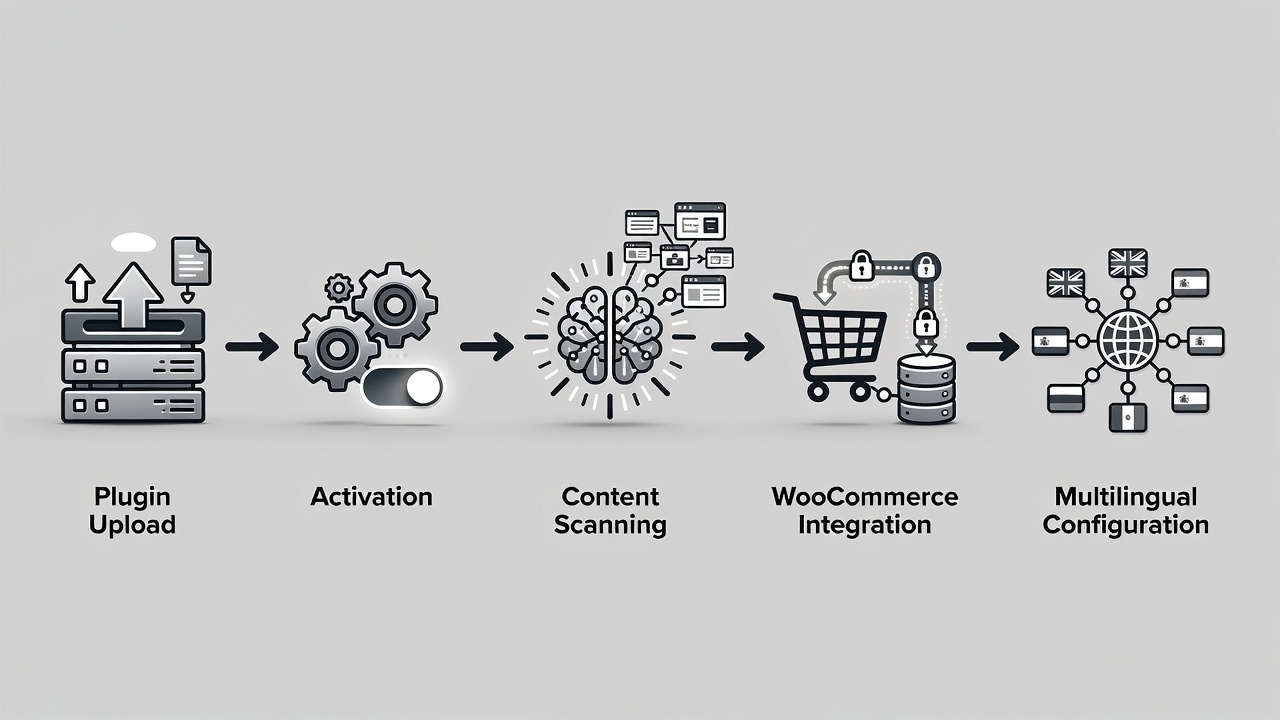
IntelliAgent AI installs through the standard WordPress plugin system using hooks, REST API, and AJAX for seamless integration. Download the plugin file from the official source, then upload it via the WordPress dashboard under Plugins > Add New > Upload Plugin. Click Activate Plugin to enable the agent on your site immediately after upload completes.
The activation process triggers WP-Cron background tasks that prepare the system without raising server load. Site administrators should confirm current WordPress and WooCommerce versions match plugin requirements before activation to prevent conflicts. A private AI knowledge base begins forming once the first content scan runs.
Experienced developers test the plugin on a staging environment first to verify compatibility with active themes and other extensions. This approach reduces live site risk during initial rollout.
Definition: A private AI knowledge base is a secure, site-specific dataset created by scanning only your own pages, posts, and files so the agent answers questions using exclusively your content.
- Upload the plugin ZIP file through the dashboard
- Activate the plugin to start background processes
- Run an initial content scan to populate the knowledge base
- Verify plugin settings appear in the WordPress admin menu
Connecting Site Content to the AI Knowledge Base
IntelliAgent AI builds a private AI knowledge base by scanning existing pages, posts, and uploaded files to deliver accurate answers drawn only from your site content. The scan process respects WordPress permission structures and runs efficiently through background scheduling.
Once the scan finishes, the agent handles visitor questions without requiring manual data entry. Store owners notice quicker resolution of common support queries because responses reference actual site materials directly.
In real-world implementations, sites with extensive product documentation see the knowledge base populate within minutes while larger catalogs may require extended WP-Cron cycles. Regular rescans keep the dataset current as new content is published.
Enabling WooCommerce Sales Features
IntelliAgent AI integrates directly with WooCommerce to enable product recommendations, add-to-cart actions, and order tracking inside the chat interface. This connection converts visitor conversations into completed purchases without forcing users to navigate away from the chat window.
The integration activates automatically upon WooCommerce detection and requires no custom code. Merchants report higher average order values because the agent suggests relevant products based on real-time conversation context.
A common mistake businesses make is overlooking the need to grant proper WooCommerce capabilities during setup, which can limit sales actions. Correct permission configuration ensures the agent performs add-to-cart and order status checks reliably.
Advanced Configuration Options
Advanced configuration allows fine-tuning of scan frequency, response style, and WooCommerce action limits through the plugin settings panel. Site owners can adjust WP-Cron intervals to balance knowledge base freshness against server resources.
Custom capability checks can be added via hooks to restrict certain AI actions to logged-in users only. This level of control supports complex store requirements while maintaining the plugin’s core WordPress standards compliance.
Configuring Multilingual Support and Training
IntelliAgent AI supports more than 40 languages natively, enabling global visitors to converse in their preferred language without additional translation plugins. Enable languages through the settings panel to activate multilingual chat immediately after installation.
AI FAQ and feedback training improves response accuracy by analyzing actual user conversations and incorporating direct feedback. This continuous training loop refines both support and sales performance over time.
Experienced site managers schedule periodic review of conversation logs to identify training opportunities that increase conversion rates on international traffic.
Troubleshooting Common Setup Errors
Common setup errors include incomplete content scans caused by file permission issues or conflicts with caching plugins. Resolve these by verifying directory permissions and temporarily disabling cache layers during the initial scan.
Another frequent issue arises when WooCommerce capabilities are not properly assigned, preventing add-to-cart actions. Re-checking user roles and plugin permissions usually restores full sales functionality.
Site owners should monitor WP-Cron logs if background syncing appears delayed, as server time settings often cause these delays.
Optimizing AI Responses for Higher Conversions
Optimizing responses involves reviewing early conversation data to adjust the agent’s tone and product suggestion logic. Sites that implement regular feedback training typically see measurable lifts in completed orders originating from chat.
A key strategy to consider is mapping high-volume support questions to specific WooCommerce product upsells within the knowledge base. This alignment turns routine inquiries into revenue opportunities.
Security, Performance, and Best Practices
IntelliAgent AI incorporates sanitization and capability checks to protect customer data throughout all interactions. All processing occurs within the site environment, maintaining privacy and compliance with WordPress security practices.
Performance stays optimized because WP-Cron handles background syncing without heavy resource consumption. Site speed remains stable even during continuous AI operations.
Regular review of conversation analytics helps identify content gaps that the knowledge base should address next. This practice prevents outdated answers from affecting user trust.
Lite Version vs Lifetime Access Comparison
| Feature | Lite Version | Lifetime Access |
|---|---|---|
| Core AI Chat | Limited responses | Unlimited conversations |
| WooCommerce Integration | Basic recommendations | Full add-to-cart and tracking |
| Language Support | English only | 40+ languages |
| Feedback Training | Not available | Continuous improvement |
| Updates and Support | Community only | Lifetime included |
Frequently Asked Questions
How long does the initial content scan take in a wordpress ai sales agent setup guide? The scan usually finishes within minutes for standard sites, although larger WooCommerce stores may require additional background processing time through WP-Cron.
Can IntelliAgent AI run on a live WooCommerce store? Yes, the plugin integrates safely with live stores and begins providing product recommendations and order tracking right after configuration.
Is there a free version available? The Lite Version supports basic testing, while full WooCommerce sales features and multilingual capabilities require the lifetime access plan.
What happens after purchasing the lifetime deal? Users receive unlimited automation, lifetime ownership, and ongoing updates with no recurring fees for their WordPress site.
Completing this wordpress ai sales agent setup guide equips your website with continuous intelligent engagement that converts interest into revenue. Visit https://aica-intelliagent.com/about/ to review current lifetime options and begin automating customer interactions.