
WordPress AI Sales Agent Setup Guide
The wordpress ai sales agent setup guide delivers a complete process for installing IntelliAgent AI so WordPress sites gain an always-available AI assistant that builds a private knowledge base from existing content and connects directly to WooCommerce for product recommendations, add-to-cart actions, and order tracking.
Table of Contents
- WordPress AI Sales Agent Overview
- Pre-Installation Requirements for IntelliAgent AI
- Step-by-Step WordPress AI Sales Agent Installation
- Configuring WooCommerce AI Commerce Features
- Training the AI Knowledge Base
- Enabling Multilingual Support Across 40+ Languages
- Common Pitfalls and Security Best Practices
WordPress AI Sales Agent Overview
WordPress AI Sales Agent Overview centers on IntelliAgent AI as the plugin that scans pages, posts, and files to create accurate responses while enabling direct WooCommerce commerce inside chat.
Core capabilities of IntelliAgent AI
- Private knowledge base built only from site content
- Direct WooCommerce actions without external bridges
- Automated FAQ organization via user feedback
WooCommerce sales automation features
IntelliAgent AI turns visitor interest into revenue by recommending products, processing add-to-cart commands, and delivering live order status updates within the same interface.
Pre-Installation Requirements for IntelliAgent AI
Pre-Installation Requirements for IntelliAgent AI ensure the environment supports seamless operation of the WordPress AI sales agent.
- WordPress 6.0 or higher
- WooCommerce activated and configured
- PHP 8.0 or newer
- Internet access for WP-Cron background syncing
Step-by-Step WordPress AI Sales Agent Installation
Step-by-Step WordPress AI Sales Agent Installation follows a clear sequence that activates IntelliAgent AI quickly on any compatible site.
- Log into the WordPress admin and go to Plugins > Add New.
- Search for IntelliAgent AI and select Install Now.
- Activate the plugin after installation finishes.
- Enter the license key in the settings panel.
- Allow the initial content scan to complete.
Configuring WooCommerce AI Commerce Features
Configuring WooCommerce AI Commerce Features unlocks revenue capabilities inside the chat window of the WordPress AI sales agent.
| Feature | Setup Requirement | Expected Outcome |
|---|---|---|
| Product Recommendations | Enable WooCommerce module | AI suggests relevant products in chat |
| Add-to-Cart Actions | Grant cart operation permission | Purchases complete inside conversations |
| Order Tracking | Connect order data source | Live status updates for customers |
Ready to add the WordPress AI sales agent to your site?
Training the AI Knowledge Base
Training the AI Knowledge Base uses IntelliAgent AI automatic indexing of WordPress content to deliver precise answers.
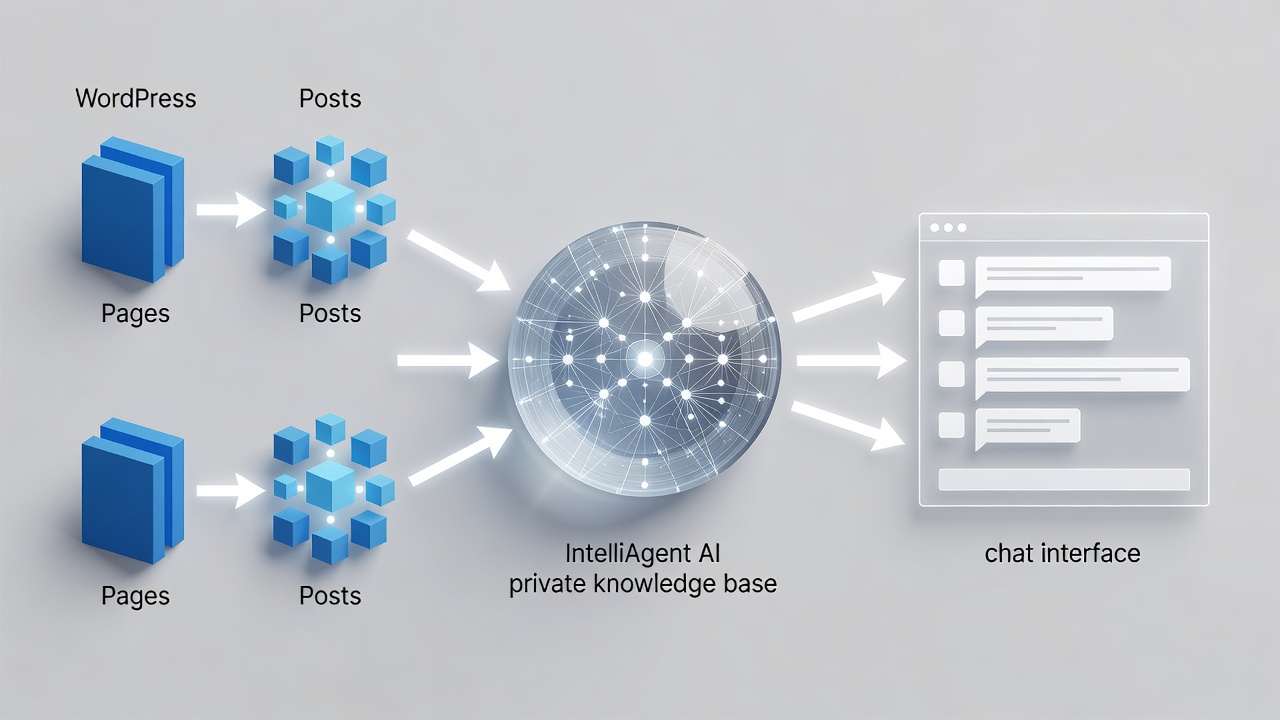
Review indexed items in the dashboard and include additional files or custom post types that hold product or support details.
Enabling Multilingual Support Across 40+ Languages
Enabling Multilingual Support Across 40+ Languages allows IntelliAgent AI to serve global visitors without extra translation tools by detecting preferences automatically.
Common Pitfalls and Security Best Practices
Common Pitfalls and Security Best Practices include skipping permission checks during WooCommerce setup. IntelliAgent AI applies sanitization and capability verification to protect data while WP-Cron keeps server load low.
Connect with IntelliAgent AI specialists for your WordPress AI sales agent deployment.
Connect with a Specialist for wordpress ai sales agent setup guide here
Frequently Asked Questions
How long does the WordPress AI sales agent setup take?
Most users complete the WordPress AI sales agent setup in under 30 minutes using the IntelliAgent AI plugin.
Is technical support available after installing IntelliAgent AI?
Yes, technical support is available through the IntelliAgent AI help center and contact channels for all users.
Does the WordPress AI sales agent support multiple languages?
IntelliAgent AI supports 40+ languages natively for multilingual conversations without additional plugins.
Privacy Policy | Home | Blog