WordPress AI Assistant Plugin Setup
WordPress AI assistant plugin setup with IntelliAgent AI lets site owners quickly install a private AI knowledge base that delivers accurate automated sales and support responses using only their existing WordPress and WooCommerce content.
Table of Contents
- WordPress AI Assistant Plugin Overview
- Prerequisites for IntelliAgent AI Installation
- Step-by-Step WordPress AI Assistant Plugin Setup
- Dashboard Installation
- License Activation
- Knowledge Base Training
- WooCommerce Integration Configuration
- Frequently Asked Questions
WordPress AI Assistant Plugin Overview
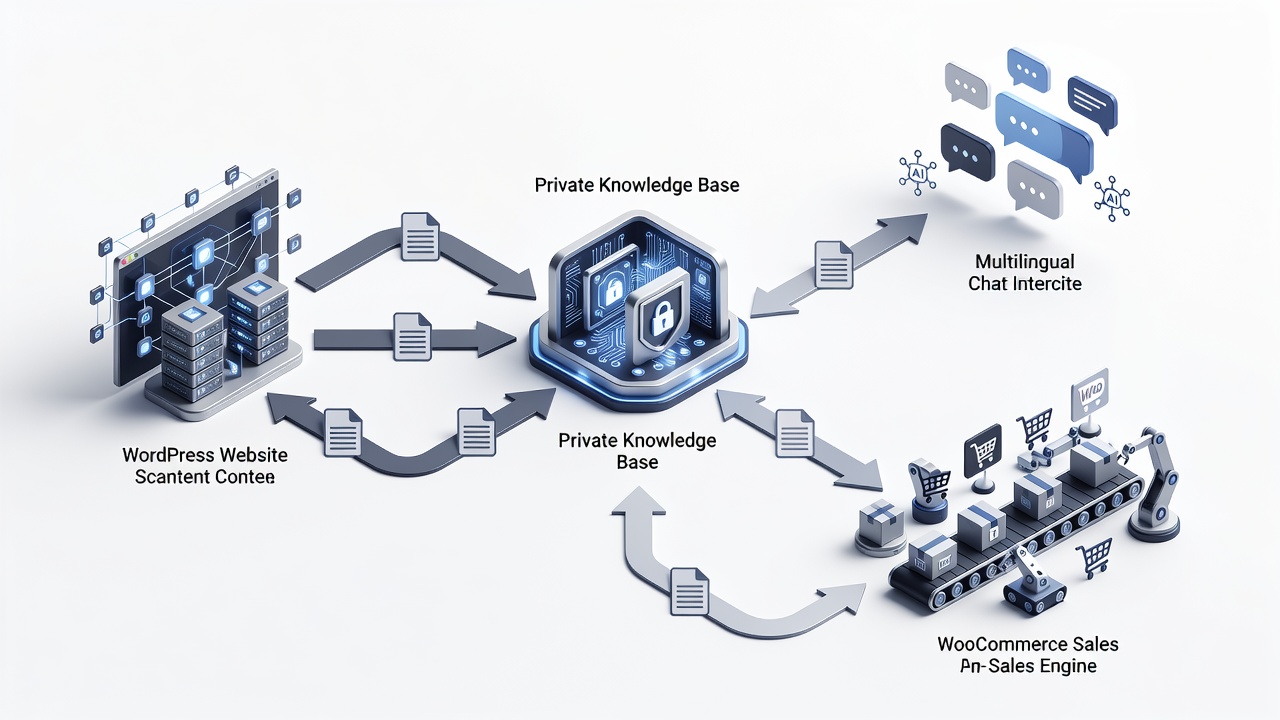
IntelliAgent AI functions as a complete WordPress AI assistant plugin that scans existing pages, posts, and product data to build a secure private knowledge base. The plugin then uses this knowledge base to deliver accurate answers while executing real WooCommerce actions such as product recommendations and order tracking.
Prerequisites for IntelliAgent AI Installation
Before beginning WordPress AI assistant plugin setup, confirm your site meets these baseline requirements. A current WordPress installation running version 6.0 or higher is necessary. WooCommerce must be active if sales features are required. Administrator access with capability to install plugins is also essential. In real-world implementations, sites that verify these prerequisites first experience fewer configuration issues and faster time to value.
| Setup Phase | Time Required | Key Actions |
|---|---|---|
| Installation | 2 minutes | Upload ZIP via dashboard and activate |
| License Activation | 1 minute | Enter license key from purchase email |
| Knowledge Base Sync | 3-8 minutes | Run full site scan via plugin settings |
Step-by-Step WordPress AI Assistant Plugin Setup
Complete WordPress AI assistant plugin setup follows a straightforward sequence that any site administrator can execute without custom coding. According to industry standards, following each phase sequentially prevents common configuration errors and ensures the private knowledge base remains accurate.
Dashboard Installation
Log in to the WordPress admin area and navigate to Plugins > Add New. Upload the IntelliAgent AI plugin ZIP file and click Activate. The plugin immediately appears in the left menu under IntelliAgent AI. A common mistake businesses make is skipping the activation step, which leaves the plugin non-functional until manually enabled.
License Activation
Enter the lifetime license key obtained during purchase inside the plugin settings screen. Activation unlocks unlimited sites and removes any trial limitations. In modern business practice, lifetime licensing eliminates recurring costs and provides long-term ownership of the AI sales and support engine.
Knowledge Base Training
Trigger the initial content scan from the Knowledge Base tab. IntelliAgent AI indexes all published pages, posts, and WooCommerce products using WP-Cron background processing to keep server load minimal. The plugin follows WordPress coding standards using hooks, REST API, and AJAX for seamless integration while maintaining security through sanitization and capability checks.
Ready to automate your support and sales?
Activate IntelliAgent AI now with lifetime access and start converting visitors into customers 24/7.
WooCommerce Integration Configuration
WooCommerce integration turns the WordPress AI assistant plugin into a revenue-generating tool. Enable product recommendations, add-to-cart commands, and real-time order status lookup directly inside the chat window. No additional plugins or custom code are required. The result is faster support, automated FAQ management, and clearer insight into what visitors actually care about while serving a global audience with 40+ language support.
Frequently Asked Questions
How long does the initial knowledge base scan take?
The initial scan typically completes within a few minutes depending on site size and number of published items. Larger sites with extensive product catalogs may require slightly more time due to background WP-Cron processing.
Can I use IntelliAgent AI on a staging site first?
Yes, you can install and test IntelliAgent AI on staging environments before going live with full confidence. This approach allows verification of knowledge base accuracy and WooCommerce actions without impacting production traffic.
Connect with a specialist for WordPress AI assistant plugin setup assistance here.