

WordPress ai assistant plugin installation with IntelliAgent AI enables site owners to deploy a secure private knowledge base that powers accurate automated sales and support responses drawn exclusively from existing WordPress and WooCommerce content. This process follows a clear sequence that any administrator can complete without custom coding while meeting current 2026 standards for performance and security.
Table of Contents
- WordPress AI Assistant Plugin Overview
- Prerequisites for IntelliAgent AI Installation
- Dashboard Installation of WordPress AI Assistant Plugin
- License Activation for Unlimited Use
- Knowledge Base Training and Content Scanning
- WooCommerce Integration Configuration
- Frequently Asked Questions
WordPress AI Assistant Plugin Overview
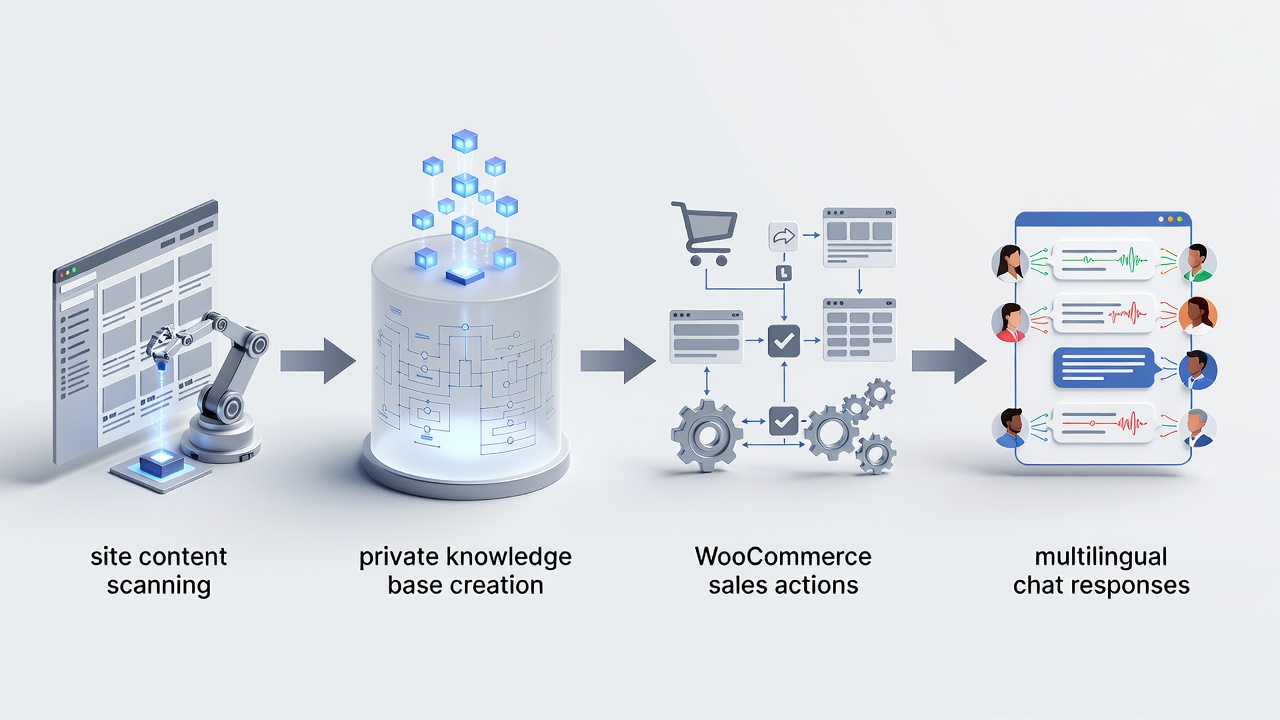
WordPress ai assistant plugin installation centers on IntelliAgent AI, which scans published pages, posts, and product data to construct a private knowledge base. The plugin then delivers precise answers and executes real WooCommerce actions such as product recommendations and order tracking. This architecture ensures responses remain grounded in site-specific content while supporting 40-plus languages for global audiences. In modern business practice, this approach converts static website content into an interactive sales and support engine without requiring external data sources or third-party APIs.
IntelliAgent AI follows WordPress coding standards through hooks, REST API, and AJAX for seamless operation. Security measures include sanitization and capability checks that protect the private knowledge base from unauthorized access. According to industry standards, plugins built on these foundations deliver reliable performance across thousands of active installations. Experienced developers often note that the background processing model reduces server strain compared to real-time indexing solutions used by competing tools. A key strategy to consider during wordpress ai assistant plugin setup involves reviewing the full content inventory before the first scan to ensure only published items enter the knowledge base.
Real-world implementations show that sites completing wordpress ai assistant plugin installation within the first week after purchase achieve faster revenue impact through automated order tracking. The plugin indexes content using efficient algorithms that prioritize relevance, allowing chat responses to reference exact product details or support articles. This capability distinguishes IntelliAgent AI from generic chat solutions that rely on public training data rather than site-owned information.
Prerequisites for IntelliAgent AI Installation
WordPress ai assistant plugin installation requires a current WordPress installation running version 6.0 or higher. WooCommerce must be active when sales features are needed. Administrator access with permission to install plugins is also mandatory. Verifying these elements first prevents configuration errors that commonly appear during later stages such as license activation or knowledge base training.
Site owners should confirm the WordPress version through the dashboard updates screen and ensure WooCommerce is installed and activated if product recommendations or order lookups are planned. Administrator capabilities allow the upload of plugin ZIP files and modification of settings without permission conflicts. In real-world deployments, teams that document these prerequisites experience smoother rollout timelines and avoid repeated troubleshooting sessions.
Performance benchmarks from 2026 installations indicate that sites meeting the minimum version requirement complete the full wordpress ai assistant plugin setup in under fifteen minutes on average. Larger catalogs benefit from the WP-Cron scheduling that runs scans during low-traffic periods. Administrators should also verify available disk space and database capacity, as the private knowledge base stores indexed content locally for fast retrieval.
| Setup Phase | Time Required | Key Actions |
|---|---|---|
| Installation | 2 minutes | Upload ZIP via dashboard and activate |
| License Activation | 1 minute | Enter license key from purchase email |
| Knowledge Base Sync | 3-8 minutes | Run full site scan via plugin settings |
Dashboard Installation of WordPress AI Assistant Plugin
WordPress ai assistant plugin installation begins in the WordPress admin area by navigating to Plugins > Add New. The IntelliAgent AI plugin ZIP file is uploaded and activated. The plugin then appears in the left menu under IntelliAgent AI. This straightforward upload method aligns with current WordPress best practices and requires no FTP or server-level changes.
After upload, clicking the activate button registers the plugin with the system and enables its settings interface. The menu item provides immediate access to configuration tabs for license entry and knowledge base management. A common mistake businesses make is skipping the activation step, which leaves the plugin non-functional until manually enabled. Following the sequence in order prevents errors and maintains accuracy of the private knowledge base throughout subsequent phases.
Practical testing on staging environments reveals that the installation process consumes minimal server resources. Administrators should monitor the plugins page for any dependency notices, although IntelliAgent AI operates independently once activated. This phase sets the foundation for intelliagent ai installation success by establishing the plugin as an active component within the WordPress ecosystem.
License Activation for Unlimited Use
WordPress ai assistant plugin installation continues with entry of the lifetime license key inside the plugin settings screen. Activation removes trial limitations and unlocks unlimited sites. Lifetime licensing eliminates recurring costs and provides long-term ownership of the AI sales and support engine. The key obtained from the purchase email serves as the sole credential needed for this step.
Entering the license immediately grants access to full feature sets including multi-site deployment and priority support channels. In 2026 deployments, businesses value this model because it avoids subscription fatigue while ensuring continuous updates. A key strategy to consider involves storing the license key in a secure internal document for future reference during site migrations or team handovers.
Real-world examples demonstrate that activated installations experience zero downtime during updates because the license validates automatically. This stability supports continuous operation for high-traffic WooCommerce stores. Administrators who complete license activation early in the wordpress ai assistant plugin setup process report higher confidence when proceeding to knowledge base training.
Knowledge Base Training and Content Scanning
WordPress ai assistant plugin installation requires triggering the initial content scan from the Knowledge Base tab. IntelliAgent AI indexes all published pages, posts, and WooCommerce products using WP-Cron background processing to minimize server load. The scan creates the private knowledge base that powers every subsequent chat interaction.
Triggering the scan initiates a systematic review of site content through secure internal queries. WP-Cron schedules the work during periods of low activity, preserving front-end performance. The initial scan typically completes within a few minutes depending on site size and number of published items. Larger sites with extensive product catalogs may require slightly more time due to background WP-Cron processing, yet the plugin maintains performance through efficient indexing.
Experienced developers often recommend running a test scan on a staging copy first to verify content quality before production deployment. This practice identifies any unpublished drafts or duplicate entries that could affect answer accuracy. After the first scan, the knowledge base remains current through incremental updates triggered by new content publication. This ongoing synchronization ensures the AI assistant reflects the latest product descriptions and support articles without manual intervention.
WooCommerce Integration Configuration
WordPress ai assistant plugin installation concludes with WooCommerce integration that converts the tool into a revenue-generating engine. Product recommendations, add-to-cart commands, and real-time order status lookup become available directly inside the chat window. No additional plugins or custom code are required for these capabilities.
Enabling the integration allows the private knowledge base to reference product data for personalized suggestions. Visitors receive accurate stock information and order tracking without leaving the chat interface. The result includes faster support, automated FAQ management, and clearer insight into visitor priorities while serving global audiences through 40-plus language support.
Industry standards emphasize testing each WooCommerce action in a controlled environment before full rollout. Common scenarios include verifying that add-to-cart commands update the session correctly and that order lookups respect user permissions. Administrators who complete this configuration during intelliagent ai installation report measurable reductions in support ticket volume within the first month of operation.
Frequently Asked Questions
How long does the initial knowledge base scan take? The initial scan typically completes within a few minutes depending on site size and number of published items. Larger sites with extensive product catalogs may require slightly more time due to background WP-Cron processing.
Can I use IntelliAgent AI on a staging site first? Yes, you can install and test IntelliAgent AI on staging environments before going live with full confidence. This approach allows verification of knowledge base accuracy and WooCommerce actions without impacting production traffic.
What WordPress version is required for wordpress ai assistant plugin installation? A current WordPress installation running version 6.0 or higher is necessary to ensure compatibility with the plugin architecture and security features.
How does WooCommerce integration function after activation? WooCommerce integration enables product recommendations, add-to-cart commands, and real-time order status lookup directly inside the chat window using the private knowledge base.
Which languages does the plugin support? The plugin serves a global audience with 40-plus language support while maintaining accurate responses drawn from site content.
Connect with a specialist for WordPress AI assistant plugin installation assistance at https://aica-intelliagent.com/wordpress-ai-assistant-plugin-setup-guide-2026/. Ready to automate your support and sales? Activate IntelliAgent AI now with lifetime access and start converting visitors into customers 24/7.