

A wordpress ai sales agent plugin transforms existing WordPress content and WooCommerce stores into an always-available AI assistant that answers questions and completes sales actions. IntelliAgent AI implements this model by scanning site assets to build a private knowledge base that powers accurate, revenue-focused conversations without external data dependencies or recurring fees.
Table of Contents
- What Is a WordPress AI Sales Agent Plugin?
- Why IntelliAgent AI Stands Out Among WordPress AI Sales Agent Plugins
- Core Components of a Private AI Knowledge Base in WordPress
- Key Features of the IntelliAgent AI WordPress Plugin
- Technical Architecture and WordPress Standards Compliance
- Step-by-Step Implementation Workflow
- Performance Optimization Using WP-Cron
- Multilingual Support and Feedback Training Best Practices
- Private Knowledge Base Versus External LLM Approaches
- Migrating to IntelliAgent AI From Other Plugins
- Pricing and Lifetime Access Options
- Frequently Asked Questions
What Is a WordPress AI Sales Agent Plugin?
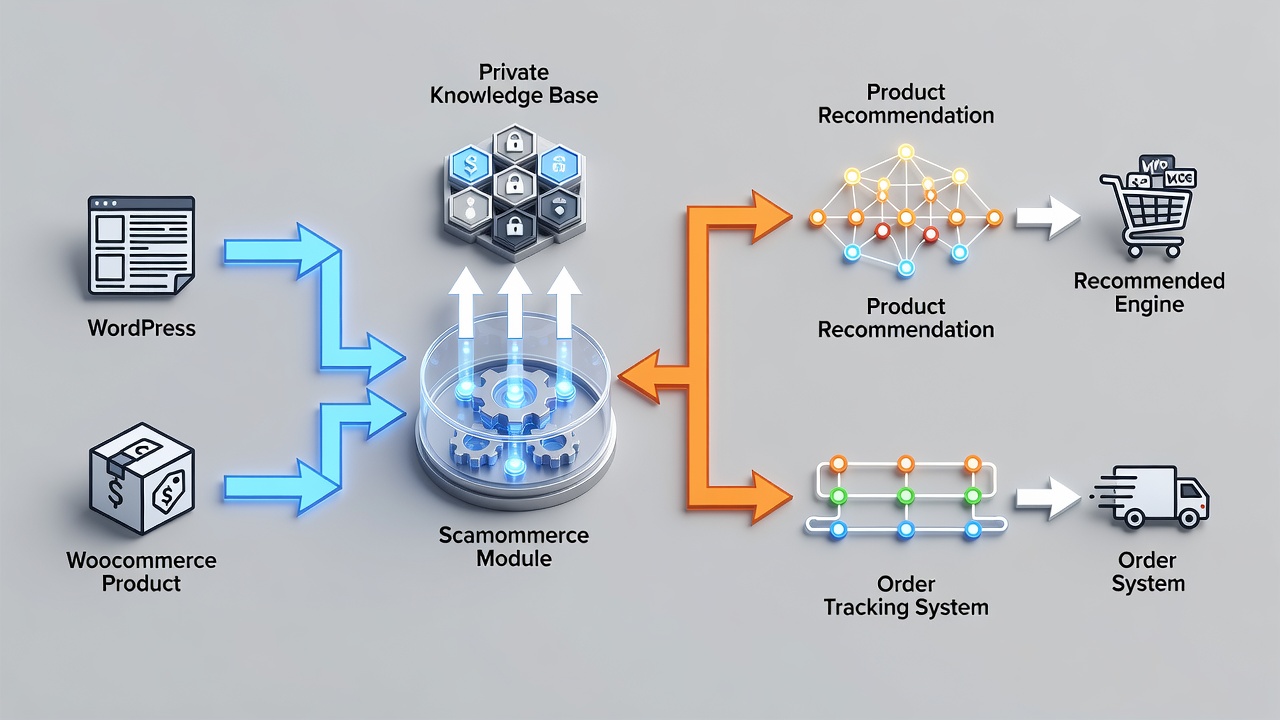
A wordpress ai sales agent plugin connects a site’s existing pages, posts, and product data to an AI system that delivers support answers and executes commercial actions inside a single chat interface. IntelliAgent AI follows this definition by creating responses exclusively from scanned site content while enabling direct WooCommerce operations such as product recommendations and order tracking.
The plugin differs from generic chat solutions because it avoids reliance on public training data and instead maintains a contained knowledge source that updates automatically when site content changes. This design reduces support volume and converts visitor questions into completed purchases without requiring separate translation tools or complex configuration.
- Scans pages, posts, and files to form the knowledge source
- Enables add-to-cart and order status actions natively in WooCommerce
- Operates without monthly fees through a one-time licensing model
Why IntelliAgent AI Stands Out Among WordPress AI Sales Agent Plugins
IntelliAgent AI builds its knowledge exclusively from the site owner’s own content, ensuring every response stays accurate and free from external hallucinations. The plugin then layers WooCommerce commerce functions on top of this base so the same conversation can move from information delivery to product recommendation and purchase completion.
According to the plugin architecture described on the official site, this combination produces faster support resolution and clearer visibility into visitor interests while eliminating subscription costs. Businesses therefore obtain both operational efficiency and revenue impact from a single installation that respects WordPress coding standards.
- Private knowledge base prevents data leakage or generic answers
- Native WooCommerce actions turn conversations into sales
- Lifetime ownership model removes recurring expense risk
Core Components of a Private AI Knowledge Base in WordPress
The private knowledge base in a wordpress ai sales agent plugin consists of four primary entities: pages, posts, product data, and user feedback signals. IntelliAgent AI processes these entities through REST API endpoints and stores them locally so the AI can reference only site-specific information during conversations.
Each entity interacts with the others through defined relationships: page content supplies general answers, product data enables commerce actions, and feedback signals refine accuracy over time. Sanitization and capability checks protect these entities during every read and write operation, maintaining security while preserving content integrity.
- Pages and posts form the foundational textual knowledge layer
- Product data supplies structured commerce attributes for recommendations
- Feedback loops update relevance without external model retraining
- REST API and AJAX handle secure data exchange between components
Key Features of the IntelliAgent AI WordPress Plugin
IntelliAgent AI supplies WooCommerce AI commerce functions that allow the assistant to suggest products, trigger add-to-cart commands, and display order status directly inside the chat window. These capabilities convert informational queries into completed transactions without leaving the conversation interface.
The plugin also delivers built-in support for more than 40 languages and an automated FAQ organization system that improves through continuous conversation feedback. All features operate within WordPress standards, using hooks and AJAX to maintain compatibility and performance.
| Feature | IntelliAgent AI | Traditional WordPress Chat Plugins |
|---|---|---|
| Private Knowledge Base | Built from your pages and files only | Often relies on external or generic data |
| WooCommerce Integration | Native product recommendations and order tracking | Limited or no direct sales actions |
| Language Support | 40+ languages built-in | Requires additional plugins |
| Training Method | Real-time feedback from conversations | Manual rule-based updates |
| Pricing Model | One-time lifetime payment available | Recurring monthly subscriptions |
- Direct commerce actions increase conversion from chat sessions
- Multilingual capability serves global audiences without extra cost
- Feedback training continuously improves answer quality
Technical Architecture and WordPress Standards Compliance
IntelliAgent AI adheres to official WordPress coding standards by implementing hooks, REST API endpoints, and AJAX requests for all front-end and back-end communication. This architecture allows the plugin to integrate cleanly with existing themes, page builders, and other plugins without conflicts.
Security is maintained through input sanitization and role-based capability checks that restrict data access to authorized users only. Background content synchronization occurs via WP-Cron, ensuring the knowledge base remains current while keeping server resource usage minimal and site speed unaffected.
- Hooks and REST API provide standardized extension points
- Sanitization and capability checks protect customer and site data
- WP-Cron scheduling prevents performance degradation
Step-by-Step Implementation Workflow
Implementation of a wordpress ai sales agent plugin begins with installing the plugin through the WordPress dashboard and activating it on the target site. The next step involves configuring the knowledge base by selecting which pages, posts, and product data should be scanned and indexed.
After the initial scan completes, administrators test sample conversations to verify answer accuracy and WooCommerce action functionality. Feedback collection is then enabled so real user interactions can refine the knowledge base over subsequent days. A common mistake at this stage is skipping the staging environment test, which can expose live visitors to incomplete responses.
- Install and activate via the standard WordPress plugin flow
- Select content sources and initiate the first knowledge scan
- Validate responses and commerce actions on a staging site first
- Enable feedback collection to start the training loop
Performance Optimization Using WP-Cron
WP-Cron in IntelliAgent AI schedules background synchronization tasks that update the private knowledge base without blocking user requests. This approach keeps the site responsive even when large content libraries are re-indexed or when feedback signals are processed.
Administrators can further tune performance by adjusting sync intervals and limiting the number of concurrent background jobs. Experienced developers often monitor server logs during the first week after deployment to confirm that WP-Cron jobs complete within expected time windows and do not coincide with peak traffic periods.
- Background syncing avoids front-end latency
- Configurable intervals balance freshness against resource use
- Low server impact supports sites with strict performance budgets
Multilingual Support and Feedback Training Best Practices
IntelliAgent AI handles more than 40 languages natively, allowing visitors to converse in their preferred language without requiring separate translation plugins. The system detects language automatically and maintains consistent answer quality across all supported languages by referencing the same private knowledge base.
Feedback training improves accuracy when site owners review conversation logs and mark helpful or unhelpful responses. A practical best practice is to review the first 50 conversations after launch to identify content gaps and then add or revise source material accordingly. This loop strengthens the knowledge base without external model retraining.
- Automatic language detection serves global audiences
- Conversation feedback directly updates answer relevance
- Regular review of early interactions accelerates quality gains
Private Knowledge Base Versus External LLM Approaches
A private knowledge base limits the AI to site-owned content only, eliminating the risk of referencing outdated or irrelevant external information. External LLM approaches, by contrast, draw from broad public datasets that may include competitor details or obsolete product specifications.
IntelliAgent AI adopts the private model so every recommendation and answer remains aligned with current site inventory and policies. This design also simplifies compliance with data residency requirements because no visitor questions leave the site infrastructure during normal operation.
- Private base guarantees content control and accuracy
- External models introduce hallucination and compliance risks
- Local processing supports data-privacy expectations
Migrating to IntelliAgent AI From Other Plugins
Migration begins by exporting conversation logs and FAQ content from the previous plugin, then mapping those items to equivalent pages or products in the new knowledge base. After installing IntelliAgent AI, administrators run the content scan and compare sample answers against the old system to confirm parity or improvement.
A frequent pitfall is neglecting to disable the previous plugin before activation, which can create duplicate chat interfaces. Testing the full migration on a staging site first prevents visitor confusion and allows time to adjust any custom WooCommerce hooks that interact with the chat layer.
- Export existing FAQs and map them to current content
- Run parallel testing before switching live traffic
- Disable legacy plugins to avoid interface conflicts
Pricing and Lifetime Access Options
IntelliAgent AI uses a one-time payment model that grants lifetime access to all core features, including ongoing updates and unlimited automation. This structure removes the recurring cost risk associated with subscription-based alternatives and provides predictable budgeting for site owners.
A current promotional offer grants 30 percent off the lifetime license when code PH30 is applied. After purchase, the plugin continues to function with full WooCommerce readiness and 40-plus language support without any additional fees or usage limits.
- One-time payment eliminates subscription management overhead
- Lifetime updates maintain compatibility with future WordPress releases
- Promotional pricing reduces initial investment for qualifying buyers
Frequently Asked Questions
What is a WordPress AI sales agent plugin?
A wordpress ai sales agent plugin such as IntelliAgent AI scans site content to create a private knowledge base that answers questions and executes WooCommerce sales actions inside chat.
How does IntelliAgent AI integrate with WooCommerce?
IntelliAgent AI connects directly to WooCommerce to deliver product recommendations, enable add-to-cart commands, and allow customers to track orders through the AI assistant.
Does the plugin support multiple languages?
Yes, IntelliAgent AI provides built-in support for more than 40 languages, allowing global visitors to interact without additional translation plugins.
What security features does it include?
The plugin uses sanitization, capability checks, and follows WordPress security standards to protect data while maintaining low server impact through WP-Cron optimization.
Is lifetime access available for AI sales agents on WordPress?
Yes, IntelliAgent AI provides lifetime access through a one-time payment with no recurring fees, including ongoing updates and full feature access.
According to the plugin architecture, the combination of a private knowledge base, native WooCommerce actions, and WP-Cron optimization creates a balanced system that supports both support efficiency and sales growth. A common implementation mistake is under-scanning content before launch, which limits early answer quality. Experienced site owners therefore allocate time for an initial content audit and staged rollout. Learn more on the official IntelliAgent AI page. The one-time payment model further ensures long-term cost predictability while delivering continuous automation capabilities.