
WordPress AI Sales Agent Setup Guide for IntelliAgent AI
WordPress AI sales agent setup with IntelliAgent AI delivers a complete installation and configuration process that activates an intelligent reasoning engine on WordPress and WooCommerce sites, enabling automated customer engagement, product recommendations, and revenue generation within fifteen minutes of activation.
Table of Contents
- WordPress AI Sales Agent Setup Prerequisites
- Step-by-Step IntelliAgent AI Installation Process
- Configuring the AI Sales Reasoning Engine
- Testing Your Live WordPress AI Sales Agent
- Frequently Asked Questions
WordPress AI Sales Agent Setup Prerequisites
WordPress AI sales agent setup requires verification of site compatibility before installing IntelliAgent AI to guarantee full functionality of the sales and support automation features.
WordPress Version Compatibility
Sites must operate on WordPress 6.4 or higher to support the IntelliAgent AI plugin without conflicts during the setup sequence.
WooCommerce Integration Needs
Active WooCommerce installations with product catalogs enable the AI sales agent to reference inventory and process checkout assistance during live sessions.
| Setup Phase | Time Required | Key Action |
|---|---|---|
| Prerequisites Check | 3 minutes | Verify WordPress 6.4+ and WooCommerce 8.0+ |
| Plugin Activation | 5 minutes | Upload and license IntelliAgent AI |
| Engine Configuration | 7 minutes | Customize sales prompts and sync products |
Step-by-Step IntelliAgent AI Installation Process
IntelliAgent AI installation follows a guided sequence from the WordPress dashboard that activates the core sales reasoning capabilities immediately after licensing.
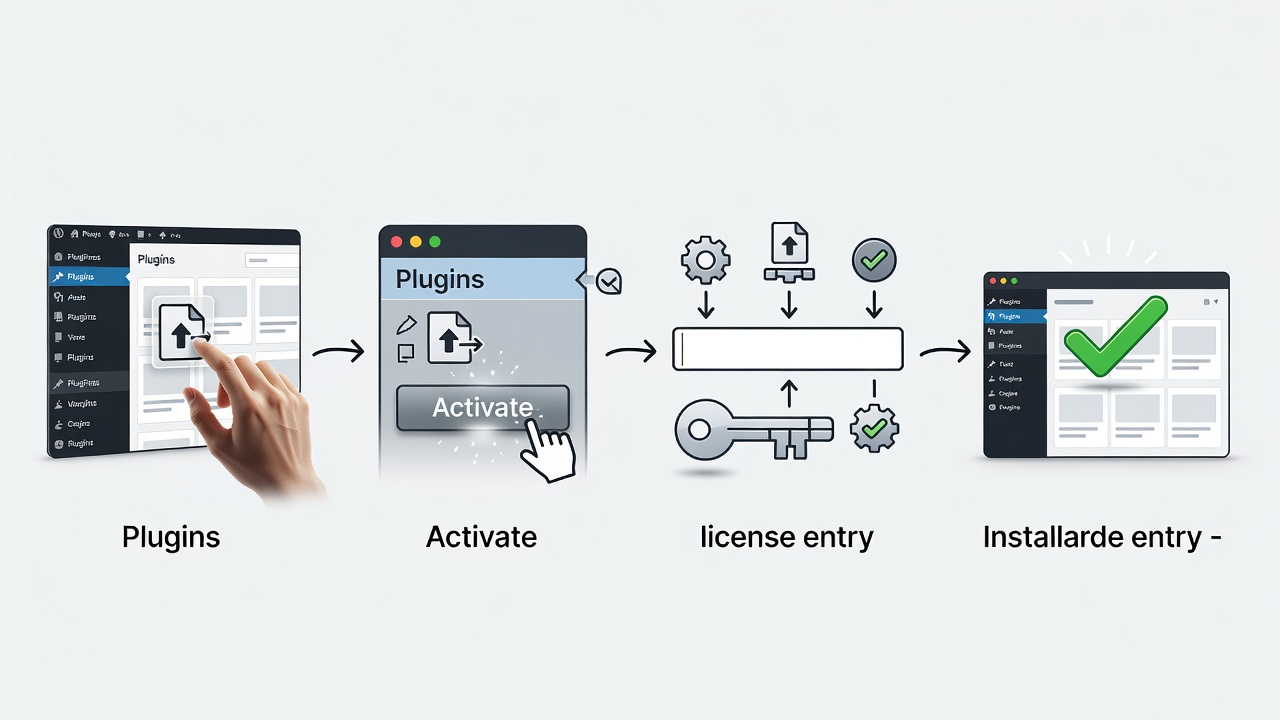
Plugin Upload and Activation
Users navigate to Plugins, select Add New, upload the IntelliAgent AI file, and activate the plugin to launch the initial setup wizard.
License Key Entry
Entering the license key from the IntelliAgent AI account dashboard unlocks the full reasoning engine and removes any trial restrictions.
Configuring the AI Sales Reasoning Engine
IntelliAgent AI configuration focuses on customizing the reasoning engine to align with specific store products and customer interaction goals.
Sales Prompt Customization
Custom prompts define how the AI handles product inquiries, upselling scenarios, and common customer objections during conversations.
WooCommerce Product Sync
Product catalog synchronization allows the AI sales agent to reference real-time inventory, pricing, and variations in every response.
Ready to complete your WordPress AI sales agent setup?
Testing Your Live WordPress AI Sales Agent
Testing confirms that the WordPress AI sales agent setup produces accurate responses and successfully converts visitor interactions into completed orders.
Chat Interface Verification
Opening the live chat widget across multiple pages verifies that the AI delivers context-aware product suggestions and support answers.
Order Conversion Tracking
Reviewing WooCommerce analytics confirms that AI-guided sessions result in measurable increases in completed purchases and resolved support requests.
Frequently Asked Questions
How long does the full WordPress AI sales agent setup take?
The complete WordPress AI sales agent setup with IntelliAgent AI typically completes in under 15 minutes when following the standard installation and configuration sequence.
Is technical knowledge required for IntelliAgent AI configuration?
Basic WordPress familiarity is sufficient for the IntelliAgent AI setup; the plugin provides guided steps for activation, licensing, and sales engine configuration without requiring coding.
Does the setup support both WordPress and WooCommerce stores?
Yes, the WordPress AI sales agent setup works seamlessly on standard WordPress sites and fully integrates with WooCommerce for automated product recommendations and checkout support.
Launch your automated sales and support system today by visiting the official IntelliAgent AI site to begin the WordPress AI sales agent setup with the Lite Version.
Connect with IntelliAgent AI for wordpress ai sales agent setup