


Managing application deployments in Kubernetes can be complex. As environments scale, ensuring consistency, reliability, and auditability becomes a significant challenge. This is where Argo CD emerges as a transformative solution, bringing the power and simplicity of GitOps to your continuous delivery pipelines.
Argo CD is a declarative, GitOps continuous delivery tool for Kubernetes. It automates the deployment of the desired application states recorded in a Git repository. By using Git as the single source of truth, Argo CD makes application deployment and lifecycle management automated, auditable, and easy to understand. It constantly monitors your running applications and compares their live state against the state defined in Git, ensuring your cluster always reflects your desired configuration.
Table of Contents
- How Does Argo CD Work? Understanding the Architecture
- Unpacking Argo CD’s Core Concepts
- Advanced Patterns and Features for Scalability
- Argo CD vs. Flux: Which GitOps Tool is Right for You?
- Getting Started: Argo CD Best Practices
- Frequently Asked Questions About Argo CD
How Does Argo CD Work? Understanding the Architecture
Argo CD’s architecture is designed around a central reconciliation loop. This process continuously compares the desired state of your applications, as defined in your Git repository, with the live state of the applications running in your Kubernetes cluster. If there’s a discrepancy, Argo CD can automatically sync the live state to match the desired state, ensuring consistency and correcting any configuration drift.
This entire process is managed by three core architectural components working in concert.
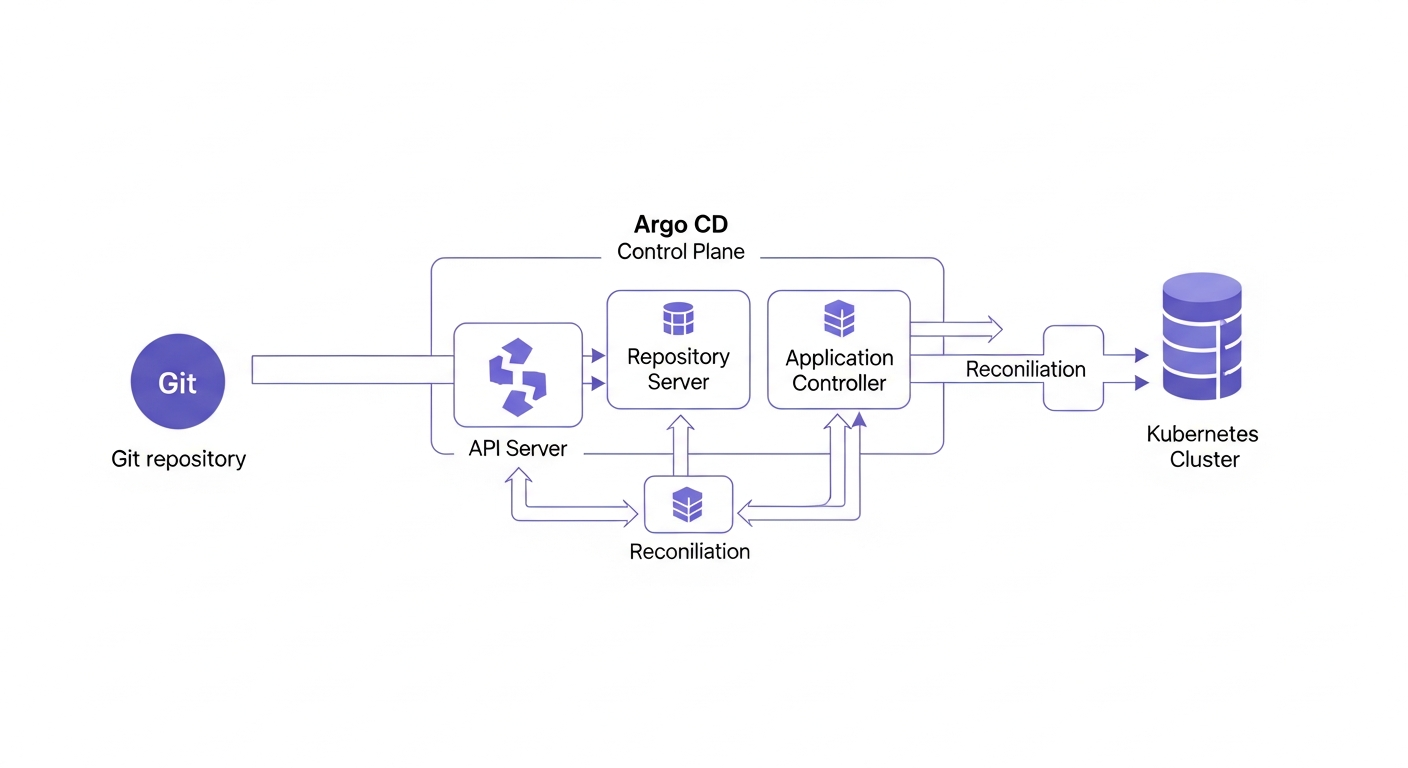
The API Server: Your Gateway to Argo CD
The API Server is a gRPC/REST server that exposes the API consumed by the Web UI, CLI, and CI/CD systems. It is responsible for managing applications, projects, cluster credentials, and handling user authentication and authorization (RBAC).
The Repository Server: Caching Your Git Manifests
This internal service is responsible for cloning your Git repositories and maintaining a local cache. It generates Kubernetes manifests by using tools like Helm or Kustomize when provided with a repository URL and application-specific parameters. This clarifies Argo CD’s role as an orchestrator that works with your existing templating tools.
The Application Controller: The Engine of GitOps
The Application Controller is the heart of Argo CD. It is a Kubernetes controller that continuously monitors running applications and compares their live state against the desired state defined in the Git repository. When it detects an `OutOfSync` state, it takes corrective action based on the application’s sync policy, either by automatically deploying the changes or by reporting the difference for manual intervention.
Unpacking Argo CD’s Core Concepts
To effectively use Argo CD, it’s essential to understand its fundamental concepts, which are defined as Kubernetes Custom Resource Definitions (CRDs).
The `Application` CRD: The Heart of Your Deployment
The `Application` CRD is the core resource that defines a deployable unit. It specifies the source of the manifests (the Git repository) and the destination where they should be deployed (the Kubernetes cluster and namespace).
Here is a basic example:
apiVersion: argoproj.io/v1alpha1
kind: Application
metadata:
  name: my-guestbook-app
  namespace: argocd
spec:
  project: default
  source:
    repoURL: https://github.com/argoproj/argocd-example-apps.git
    targetRevision: HEAD
    path: guestbook
  destination:
    server: https://kubernetes.default.svc
    namespace: guestbook
Sync Policies and Status: Controlling How and When to Deploy
Argo CD provides fine-grained control over deployments. A sync policy can be configured for automatic synchronization, where Argo CD deploys changes as soon as they are detected in Git, or for manual synchronization, which requires a user to trigger the deployment. The sync status indicates whether the live state matches the desired state (`Synced`) or if there is a drift (`OutOfSync`).
Application Health Status: Beyond Pod Readiness
Argo CD assesses application health not just by whether pods are running, but by evaluating the overall state of its Kubernetes resources. It understands the health of various resource types (Deployments, Services, Ingresses) and can even be extended with custom health checks written in Lua, providing a much richer, more accurate picture of your application’s status.
Advanced Patterns and Features for Scalability
Argo CD includes powerful features designed to manage complex deployments and enterprise environments, making it a scalable solution for any organization.
The ‘App of Apps’ Pattern: Managing Complexity at Scale
For complex systems, the ‘App of Apps’ pattern uses a single Argo CD application (the parent) to deploy and manage other Argo CD applications (the children). This allows you to declaratively manage your entire application landscape from one root application. The parent app simply points to a directory in Git containing the YAML manifests for the child apps.
apiVersion: argoproj.io/v1alpha1
kind: Application
metadata:
  name: root-app
  namespace: argocd
spec:
  project: default
  source:
    repoURL: https://github.com/my-org/cluster-config.git
    targetRevision: HEAD
    path: my-applications/
  destination:
    server: https://kubernetes.default.svc
    namespace: argocd
Orchestrating Deployments with Sync Waves and Hooks
For applications with dependencies—like a database migration that must run before the application pods start—Argo CD provides Sync Waves and Hooks. Sync Waves allow you to assign a priority to your manifests, ensuring resources are created in a specific order. Hooks provide even more control, allowing you to run scripts or jobs at different phases of the sync process (e.g., `PreSync`, `Sync`, `PostSync`).
Automating with ApplicationSets
The ApplicationSet controller is an extension of Argo CD that automates the creation of applications from a single manifest. It uses generators to create applications based on various sources, such as a list of clusters or directories in a Git repository, which is ideal for multi-cluster or multi-tenant environments.
A key strategy to consider is using ApplicationSets to automatically provision applications for new developer pull requests, creating dynamic preview environments that significantly accelerate the review process.
Furthermore, for advanced deployment strategies, Argo CD integrates seamlessly with **Argo Rollouts**, a related project that brings canary, blue-green, and other progressive delivery techniques to Kubernetes.
Argo CD vs. Flux: Which GitOps Tool is Right for You?
Argo CD and Flux are both leading CNCF-graduated projects for GitOps, but they have different philosophies and features. Choosing the right one depends on your team’s needs and workflow preferences.
| Feature/Aspect | Argo CD | Flux CD |
|---|---|---|
| User Interface | Comprehensive web UI for visualization and management. | No native UI; primarily CLI and Git-driven. Relies on third-party dashboards. |
| Multi-Tenancy | Built-in with Projects, RBAC, and SSO integration. | Achieved through Kubernetes RBAC and separate controller instances. |
| CRD Management | A monolithic `Application` CRD defines source and destination. | Multiple granular CRDs (e.g., `GitRepository`, `Kustomization`, `HelmRelease`). |
| Bootstrap Process | Typically installed via Helm or operator; configuration is then managed via UI/CLI. | Strong bootstrap command (`flux bootstrap`) to manage itself from Git. |
Getting Started: Argo CD Best Practices
Adopting Argo CD effectively involves more than just installation. Following best practices ensures your GitOps workflow is secure, scalable, and maintainable.
Structure Your Git Repositories for Success
Decide on a repository strategy. You might use a single monorepo for all manifests, or have a separate repository for each application. A common, effective approach is to have a dedicated GitOps repository that contains the declarative configuration for all your applications and environments (e.g., dev, staging, prod).
A common pitfall is using a single branch for all environments. This is risky and can lead to accidental promotions. Instead, use separate branches (e.g., `staging`, `main`) or directories for each environment to create a clear promotion path for changes.
Manage Secrets Securely in a GitOps World
Never commit plain-text secrets to Git. Instead, integrate a secrets management tool. You can use the `argocd-vault-plugin` to dynamically inject secrets from HashiCorp Vault at sync time, or use a solution like Bitnami Sealed Secrets or SOPS to encrypt secrets before committing them.
Leverage Health Checks for Reliable Deployments
Use Argo CD’s built-in resource health checks to get a true understanding of your application’s status. For complex applications, write custom Lua health checks to verify dependencies, database connections, or other critical components before marking a deployment as successful and complete.
Frequently Asked Questions About Argo CD
What is Argo CD primarily used for?
Argo CD is primarily used for implementing GitOps to automate the deployment and lifecycle management of applications on Kubernetes. It ensures that the live state of applications in a cluster matches the desired state defined in a Git repository, providing automated, auditable, and reliable continuous delivery.
Is Argo CD a replacement for Jenkins or other CI tools?
No, Argo CD is not a CI (Continuous Integration) tool and does not replace tools like Jenkins. It is a CD (Continuous Delivery) tool that works alongside CI systems. A typical workflow involves a CI tool building an image and pushing it to a registry, then updating a manifest in Git, which Argo CD then detects and deploys.
How does Argo CD handle rollbacks?
Argo CD simplifies rollbacks through its Git-based workflow. To roll back, you simply revert the commit in your Git repository to a previous stable state using standard `git` commands. Argo CD will automatically detect this change and sync the Kubernetes cluster back to the configuration defined in that older, stable commit.
Can Argo CD manage multiple Kubernetes clusters?
Yes, a single Argo CD instance can manage deployments to multiple Kubernetes clusters. You can register external cluster credentials within Argo CD, allowing it to deploy and manage applications across your entire infrastructure from a centralized, single pane of glass.
By embracing a GitOps workflow with Argo CD, development teams can achieve faster, more reliable, and more secure application delivery on Kubernetes. It empowers developers to manage both applications and infrastructure with the same familiar Git-based processes, creating a clear, auditable trail of every change from development to production.